Table of Contents
The shift by 2026 isn’t really about working harder or longer; it’s about removing the small frictions that used to eat minutes throughout the day. People who use these tools regularly tend to report meaningfully faster turnaround on writing, research, and content-heavy tasks, particularly in marketing, customer support, and academic work.
That popularity has a downside worth taking seriously: malicious browser extensions impersonating legitimate AI tools have become a real problem, often requesting excessive permissions to harvest browsing data or personally identifiable information. Before installing anything, check that it’s listed by a verified developer, read the permissions it requests, and look at recent reviews rather than just the overall star rating; a sudden spike in 1-star reviews mentioning data or billing issues is a real warning sign.
How I tested these
I tested these extensions from 25 March to 2 April using Chrome on mobile. Each extension completed four tasks: rewriting an email, summarizing a long article, summarizing a 40-minute YouTube video, and answering a factual question that required sources. I recorded completion time, edits required, citation quality, and any usage limits encountered.
Why AI Chrome Extension is Essential in 2026

The benefit of using these apps is not how interesting they are, but that they make it easier for you to copy/paste text from one screen into another. So you can highlight a section of text, get a summary or just highlight a sentence and immediately get that rewritten. This saves time throughout the day just by reducing the number of steps you have to take when using these apps.
AI tools have become a standard tool for many on Chrome. Some examples include:
- Summarising a long article or report in seconds
- Accessing free help for writing from anywhere you are typing (Gmail, Docs, LinkedIn, Slack)
- Streamlining small repetitive tasks (rewrite a line, translate a paragraph)
- Finding research or code-related information without switching to another tab.
These tools will not replace the need to know what you are talking about or to proofread your work; however, they will reduce how much time you spend doing these tasks associated with writing and researching.
Read More: How AI Is Changing the Way We Work in 2026
Top AI Chrome Extensions to Boost Work in 2026
In 2026, we will be looking at the most helpful and used AI Extensions that are really able to make an impact daily.
1. ChatGPT Sidebar
A few different extension apps are named “ChatGPT Sidebar,” but Sider, the one with the most activity/development as of 2026, provides you with a persistent sidebar panel that works across all web pages and allows you to access GPT-5.x, Claude, or Gemini depending on your subscription level. In addition, you have two options (both free) for the “sidebar” type application, which consist mainly of quick access panels into your own existing ChatGPT account (Sidebar for ChatGPT & SideAI) rather than functioning as stand-alone AI subscriptions.
One of the most critical advantages of this type of approach to using chat-based AI is that you can complete two tasks at the same time (i.e., having an ongoing thread of emails while looking at the original email OR asking back-and-forth questions about an article while maintaining your position on the page).
Pros:
- Generates less time spent switching between tabs for research and writing
- No charge for using the two free, lightweight options with your existing ChatGPT account (Sidebar for ChatGPT & SideAI)
- Convenient to have GPT, Claude, and Gemini accessible from one location (Sidebar) instead of having three different subscriptions.
Honest cons:
- The “free forever” claims on some of these extensions only cover the sidebar shell; you are still bound by your underlying ChatGPT plan’s usage limits unless you pay for the extension’s own AI credits
- Sider’s paid tier is a separate subscription from ChatGPT Plus, focused on multi-AI access rather than ChatGPT-specific organisation features
- A crowded space – there are now over a dozen near-identical sidebar extensions, and quality varies a lot
2. GrammarlyGO AI
GrammarlyGO is a generative AI layer built into Grammarly’s standard extension instead of being a stand-alone product. The old abilities for grammar correction and spell checking are coupled with the new abilities to change tone, rewrite full sentences, and convert a prompt into a short draft.
If the main thing you want to improve about your writing is “it doesn’t sound quite right enough”, this extension is the one I would recommend first. An example of tone detection would be identifying an email that reads curt or passive-aggressive, which a standard spell checker cannot do.
Pros:
- Grammarly’s AI assistant provides generative writing, rewriting, tone adjustment and brainstorming features within Grammarly.
- Available across many different applications, including Gmail, Google Docs, LinkedIn, and within most text boxes in Chrome.
- Tone detection is one of the best features of AI in this category. It is very useful.
Honest cons:
- Pro is $144/year billed annually or $30/month billed monthly; the jump to monthly billing is steep, so annual is really the only sensible option if you commit
- The Better Business Bureau has logged a notably low rating, driven mostly by billing complaints, surprise renewal charges after forgotten trials – set a calendar reminder if you start a trial
- Not a content generator in the way Jasper or ChatGPT are; it edits and rewrites what you’ve written more than it creates from scratch
3. Merlin AI
Merlin is a multi-model extension that allows you one subscription to access multiple models (GPT, Claude, Gemini, etc.) through a single sidebar, as well as dedicated tools for summarising YouTube content, responding to Gmail messages, and creating LinkedIn posts. This product is designed as a less expensive option than paying separately for ChatGPT Plus and Claude Pro.
The YouTube Summary feature was especially impressive in testing, getting a structured summary of a 40-minute video in seconds is a task that saves genuine time, not just a few clicks.
Pros:
- Merlin’s free plan advertises a daily query allowance without requiring a credit card, so you can properly test the product for free
- Merlin costs $19/month annually, which is substantially lower than paying for ChatGPT Plus and Claude Pro separately
- YouTube and Gmail integrations are exceptionally well developed and not simply afterthoughts
Cons:
- Unlimited or high-volume usage remains subject to Merlin’s fair-use policy, and practical limits may vary by model and subscription plan
- Heavy users may run into monthly message caps on premium models such as Claude Opus.
4. Perplexity AI Extension
With respect to general assistance, Perplexity is chiefly a research tool that provides answers sourced from published materials. Perplexity tends to be the most reliable of the tools mentioned here for fact-checking as well as for quickly locating original sources.
The advantages are:
- Citations provided in real-time so you can confirm the correctness of the AI’s answer rather than simply relying on the AI’s word
- Follow-up questions, research collections, and mode options (academic/writing/mathematics) are features of the free plan
- The free plan includes a daily allowance of advanced searches; exact limits change and should be verified on Perplexity’s plan page rather than assumed from this article
The following are the disadvantages:
- Perplexity was designed primarily as a research and search tool, not for generating long-form or creative content
- The company has received criticism and lawsuits over attribution practices, which is a consideration if your workflow depends on properly sourced citations
5. Jasper AI Everywhere
Although Jasper’s browser extension lets you create content for common web text applications such as Gmail, Google Docs, and social media tools, it’s designed primarily for marketers who work in multiple locations instead of for an individual who uses the internet casually on a day-to-day basis. It’s the most expensive product on this list and does not have a permanent free tier.
Advantages of Jasper:
- Allows users to create content in many locations (e.g., Gmail, Google Docs) and across multiple social media tools/systems, which is useful for marketers who operate in many environments.
- Provides users with features to develop their voice and better manage their knowledge base, which will help to prevent the AI-generated content from sounding ‘generic’ once it has been established correctly.
- Is the product on this list that is geared specifically toward creating long-form (blog posts, ad copy, SEO content) marketing content.
Disadvantages of Jasper:
- Jasper Pro costs approximately $59 per month when billed annually or $69 when billed monthly. Business pricing is customized. Jasper may offer a limited Pro trial.
- According to Jasper’s official billing policy, cancellation generally prevents the next renewal while access continues until the end of the current billing period. Trial users should cancel before the trial ends to avoid being charged.
- If you only need help with occasional writing projects, Jasper may not be the best option since it was designed as a team-based, high-volume content creation tool.
Read More: Future Tech Trends to Watch in 2026: AI, & Innovation
Pricing and Feature Comparison
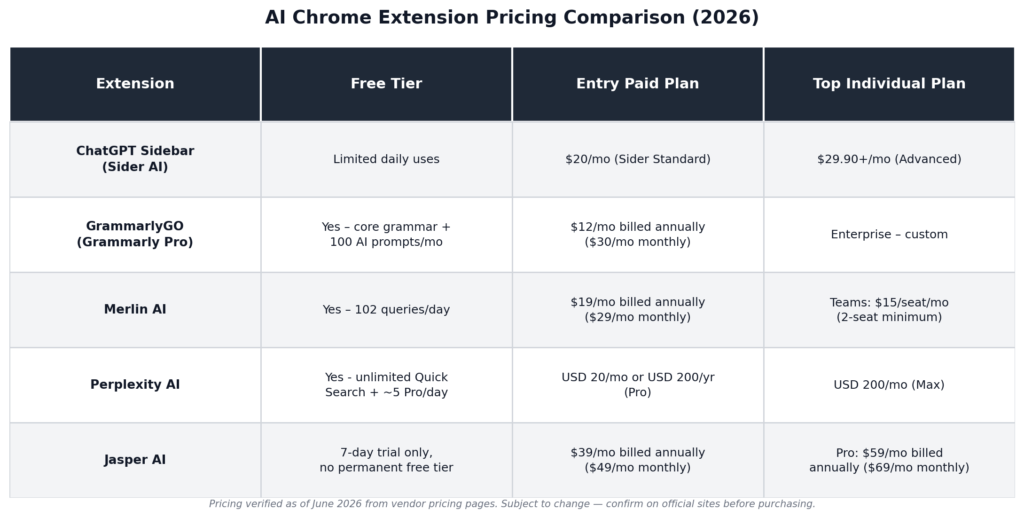
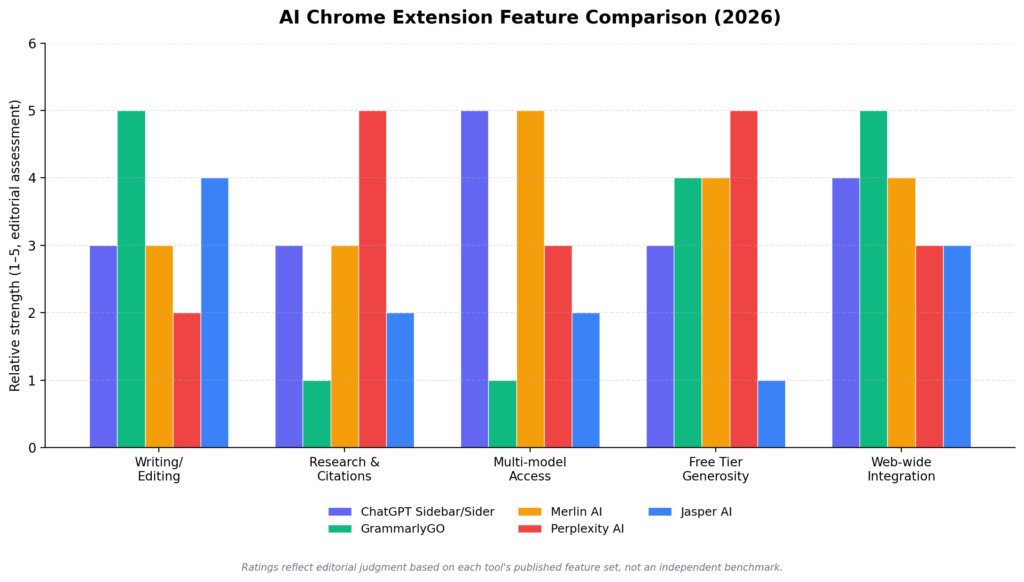
A few things stand out once the numbers are side by side. Grammarly and Merlin have the most usable permanent free tiers; you can genuinely work inside them daily without paying. Perplexity’s free plan is strong for casual research but starts to pinch under heavy use. Jasper is the clear outlier on price, and that’s by design: it’s selling to marketing teams with budget for it, not to someone who wants a one-off writing assist now and then.
Best AI Chrome Extension for Productivity and Workflows

The time savings is more visible in how workflows rather than how much time is spent doing each task. Instead of opening another web browser tab to go to ChatGPT, copying a paragraph from there, waiting for ChatGPT to send back the result, copying that back into the email, and closing that tab all have saved no time (in terms of the amount of time required to get an answer), you now just highlight the text, send it to ChatGPT, and receive the answer.
When you consider the entire day of emails, doing research, and writing makes for a large amount of time saved each day, although each individual instance did not produce dramatic time savings.
A writer can create a first draft of an article in less than 1 minute. A developer can explain an error message while looking at the page the developer is debugging. A student can generate a list of important points from a lecture before studying for that period. The AI makes no changes to any task but saves the user an amount of time before they get started on the next task.
How AI Chrome Extension is Changing Work Culture
The shift by 2026 isn’t really about working harder or longer; it’s about removing the small frictions that used to eat minutes throughout the day. People who use these tools regularly tend to report meaningfully faster turnaround on writing, research, and content-heavy tasks, particularly in marketing, customer support, and academic work.
That popularity has a downside worth taking seriously: malicious browser extensions impersonating legitimate AI tools have become a real problem, often requesting excessive permissions to harvest browsing data or personally identifiable information. Before installing anything, check that it’s listed by a verified developer, read the permissions it requests, and look at recent reviews rather than just the overall star rating; a sudden spike in 1-star reviews mentioning data or billing issues is a real warning sign.
Choosing the Right AI Chrome Extension for You
The selected tool must address the corresponding issue in your workflow. Do not install multiple tools at once:
- If your only writing and need your writing to be cleaner: Use GrammarlyGO. This tool is the quickest way to get started, and its free tier will likely meet almost all of your casual writing needs.
- If you are conducting research and need a source to trust: Use Perplexity . The inline citations are what set this tool apart.
- If you want one subscription instead of 3: Use Merlin AI (especially if you utilise YouTube and Gmail frequently).
- If you are generating marketing content at an exceedingly high rate: Use Jasper, but only if your budget allows for it and your team is large enough to warrant this tool – Jasper was not designed for people who will only occasionally create marketing content.
- If you are constantly switching back-and-forth between a web page and a chat with AI: Use a ChatGPT sidebar extension (such as Sider); or, if you already pay for ChatGPT, consider using one of the free shells (such as SideAI) as an alternative.
Begin by installing one or two of the tools. Running more than three or four AI extensions at once will tend to slow down Chrome and, instead of providing increased value, will create confusion by being overlapping.
FAQs: Best AI Chrome Extensions to Boost Work in 2026
1. Do I need to pay to get real value from these tools?
Not necessarily; both Grammarly Free and the 102 queries that are free on Merlin can be used independently without any payment or upgrading. Perplexity also provides a great freer research tier that is useful for casual users. Jasper does not provide a true free option.
2. Are these extensions safe to install?
Each of the five reviewed here comes from companies with a well-established reputation and a current public privacy policy. All AI assistant extensions (not only the five discussed here) face a considerable impersonation issue, and several unauthorised “AI assistant” extensions are being published to the Chrome Web Store to steal user data. Therefore, be sure to verify developers, check their permissions and read the most recent reviews before installing an extension.
3. Can I use more than one of these at the same time?
Yes, you may use more than one extension at a time but be sure to use them in a thoughtful manner. For example, combining Grammarly with a research tool, like Perplexity, would work well, as there is no duplication of service. Having two or three of the same model open in a sidebar creates clutter and adds to the potential slowness of Chrome.
4. Will an AI Chrome extension actually improve my SEO or content writing?
It can help with structure, readability, and keyword suggestions, but none of these tools should be your only editing step – search engines and readers both penalise generic AI-sounding writing. Treat AI output as a first draft, not a final one.
5. Do AI Extensions work offline?
Most AI Chrome Extensions do not work offline as they utilize a cloud-based AI process to deliver functions; however, many AI Chrome Extensions will still work in an offline mode, depending on the Features of the Extension. Basic editing and/or access to information you have previously saved (prior to being offline) may still be available in offline mode.
About the Author
Emily Carter is a freelance writer and digital productivity researcher based in the United States. Over the past four years, she’s tested and written about the tools, apps, and platforms that freelancers and remote workers rely on daily, from security software like password managers to the AI tools and side-income platforms that make up the modern freelance toolkit. She writes from firsthand use, not press releases.