Table of Contents
I have built and sold digital products across three different platforms over the past few years: templates on Etsy, a course on Gumroad, and eventually my own Shopify store once the numbers justified it. Most of what I read before starting was either recycled listicle advice or vague “just find your passion” fluff that didn’t hold up against an actual invoice. This is the version I wish I’d had: real fee numbers, an honest accounting of what went wrong, and the math I actually run before pricing anything.
If you want the short version: yes, it still works in 2026, but the platform you pick and the price you set matter far more than most guides let on. Here’s everything, worked out in detail.
Read More: Best Smart Gadgets for Productivity in 2026
Why Selling Digital Products Online Works in 2026

When you take out the hype, the economics of the matter are pretty clear-cut. Digital products don’t have additional material, storage, or shipping costs each time they are sold. This is largely why the margins on digital products differ from the margins on physical products.

Digital products tend to have a much higher gross margin than physical products for all three major reasons mentioned earlier (no manufacturing costs, no inventory costs, no shipping costs). Therefore, digital products generally have a much higher gross margin than physical products do because of the lack of manufacturing costs, inventory costs, and shipping costs.
The consensus is that digital products typically have a gross margin of 70%-90%, while handmade physical products typically have a gross margin of around 20%-40% (after accounting for the cost of materials and shipping). That is the gross margin of the product before any platform fees or your own time are taken into account, and the platform fees are usually much higher than most sellers expect (for more information on that, refer to the examples provided below).
One more factor that will continue to provide a tailwind to the digital space is the continuing increase in demand for online courses, templates, and tools (such as downloadable tools). There are now very inexpensive and usable tools such as Canva, Notion, and (maybe) a decent quality screen recorder that allow anyone who wants to create a digital product to start producing this type of product without the need for anything more than a single product, with little or no upfront investment required.
Sell Digital Products Online: Step-by-Step Strategy
My huge blunder with developing the first product – a “complete” social media planning template – was doing all of the work without having confirmed with anyone that they wanted or needed it. I spent three full weeks producing it, only sold 4 copies in 2 months, versus the second product – a single-page content calendar built over a weekend after observing a repeated question in a Facebook group (which outsold the first product in the first week it was available).
The lesson here is to work paradoxically, backwards from a specific Visible-pain Point, rather than forwards based on an idea you fancy.
A practical roadmap would look something like this:
- Identify a Very-Narrow/Specific Pain Point: You will be competing against nothing when you say “a fitness guide”; however, you do have a very specific and likely easily identifiable market to sell to when you say “a 20-minute home workout for new parents without the ability to get to the gym”.
- Validate that people are already searching out the identified pain. Validating that people are currently searching out this pain is as simple as performing an Etsy search. Pinterest Trends, Reddit Threading, and just the repeated questions in Facebook Groups, and Sub-Reddits within your niche are FREE validation signals for you. If no one is asking about your target listing, there is validation for you again.
- You must create the Simplest product possible that will solve this identified pain rather than creating the largest. Build an MVP, Sell It, collect real-life feedback from Paying Customers, and improve it after you collect Real Customer Validated Feedback.
Choosing the Right Digital Product

You don’t need an original idea. You need something that removes a task someone doesn’t want to do themselves. The formats that have held up consistently through 2026:
- Online courses and short mini-courses
- Templates (Canva, Notion, Excel, Google Sheets)
- Ebooks and how-to guides
- AI prompt packs and workflow files
- Subscription or membership content
- Small tools and browser-based apps
A quick validation test I actually use: before building anything, I write the product’s one-sentence pitch and try to say it out loud to a friend without adding “and it also…” If the sentence needs a second clause to make sense, the product is probably solving two problems instead of one – split it. My best-selling template does exactly one thing. My slowest-selling one tries to do four.
Read More: Online Work Scams to Avoid in 2026
Creating Your First Digital Product
In 2026, the process of producing a new product is very manageable. You no longer require extensive experience or expensive instruments to do so.
Most inexperienced entrepreneurs have used the following programmes:
- Canva (to create templates and designs)
- Google Docs (to create eBooks)
- Notion (to produce dashboards)
- Screen capture software (to create courses)
The important distinction in creating a product relates directly to its level of complexity versus clarity. You need to design your product with one goal in mind to effectively provide an answer to the following two questions what problem does this solve and how quickly can I expect results?
Well-developed digital products do not necessarily have to be lengthier than any other digital products or more complicated than an average product. On average, shorter, tighter products deliver results sooner than larger products.
Where to Sell Digital Product Online
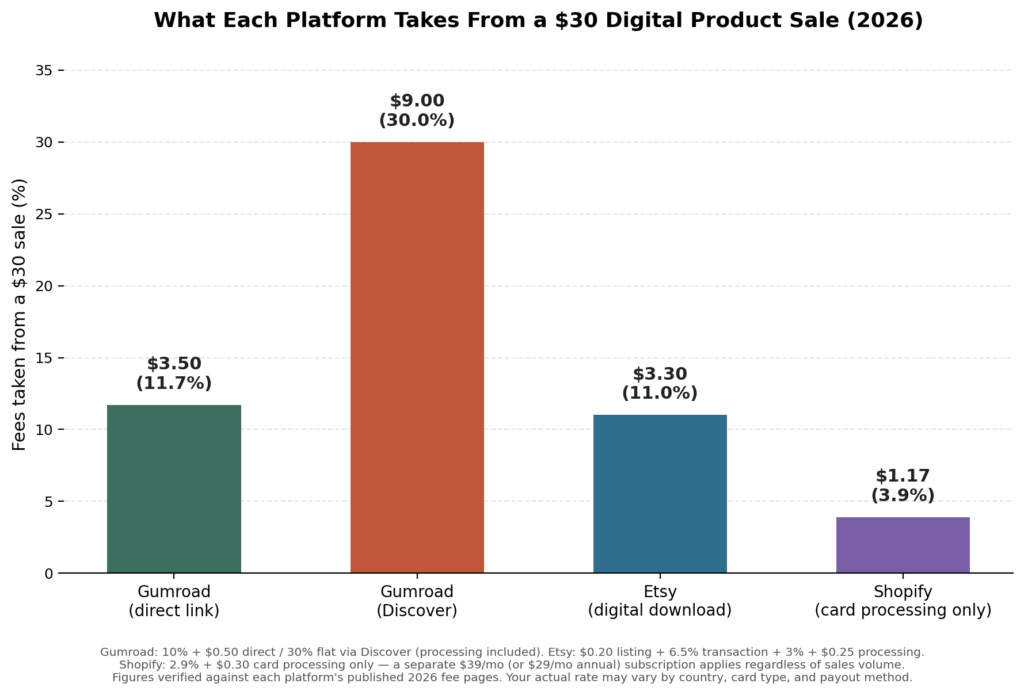
This is the decision that affects your take-home pay the most, and it’s the part almost every other guide waves away with “try Gumroad or Etsy!” The platforms charge genuinely different amounts, and the gap compounds fast once you are selling regularly. Here’s what each one actually charges, pulled from their current, published 2026 fee pages.
Gumroad vs. Etsy vs. Shopify: Fees Compared (2026)
| Platform | Monthly Cost | Per-Sale Fee (digital goods) | Built-In Audience | Best For |
|---|---|---|---|---|
| Gumroad | $0 | 10% + $0.50 direct; 30% flat via Discover | Small (creator-led) | Zero setup, built-in global tax handling |
| Etsy | $0 (Plus optional, $10/mo) | $0.20 listing + 6.5% + ~3.25% processing (~11% total) | Large (92M+ active buyers) | Beginners who want search traffic without an existing audience |
| Shopify | $39/mo (Basic; $29/mo billed annually) | 2.9% + $0.30 card processing only | None — you drive your own traffic | Sellers ready to build a brand with existing traffic |
| Your own site (self-hosted checkout) | Varies (hosting + checkout tool) | Payment processor rate only, ~2.9% + $0.30 | None | Established creators maximising long-term margin |
A few things the numbers reveal that most comparison articles skip:
- Gumroad’s Discover fee is not optional. If a buyer finds your product through Gumroad’s own marketplace instead of your direct link, the fee jumps from 10% to a flat 30%, and you can’t control which sales get routed that way.
- Etsy’s fees stack in a way that’s easy to underestimate. Individually, the listing fee, transaction fee, and processing fee look small. Combined, they land around 11%, and Etsy auto-enrols sellers earning over $10,000 in trailing 12-month sales into Offsite Ads, an additional 12–15% fee on ad-attributed sales, with no opt-out.
- Shopify flips the model entirely. Instead of a percentage of every sale, you pay a flat monthly subscription and then only the card processor’s rate. That means Shopify gets cheaper per sale as volume grows, but it costs money every month whether you sell anything or not, and you are responsible for all your own traffic.
When Does It Actually Make Sense to Switch to Shopify?
This is the question I couldn’t find a straight answer to when I was deciding, so I ran the math myself, assuming a $30 average sale price across all three platforms:
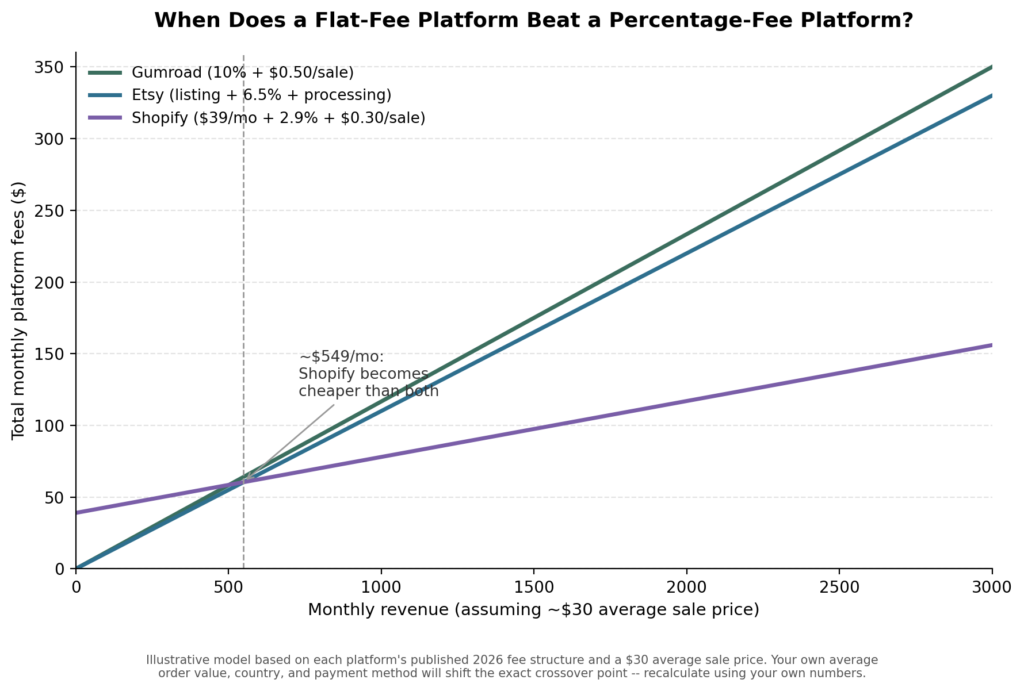
At roughly $550/month in revenue (at a $30 average price point), Shopify’s flat monthly fee becomes cheaper than both Gumroad’s and Etsy’s percentage-based cuts. Below that line, you’re paying for a subscription you haven’t earned back yet. This is roughly the threshold where I moved my own shop over, not because Shopify is “better,” but because the math finally tipped in its favour.
Pricing Your Digital Product the Right Way
The most common mistake I see and the one I made on my first product is underpricing out of fear that a higher number scares buyers off. Price should track the value delivered (time saved, money earned, problem solved), not the hours you spent building it.
Tiered pricing remains one of the more reliable structures, because it lets different buyers self-select instead of you guessing at one “right” price:
| Tier | Example Price | What’s Included | Who It’s For |
|---|---|---|---|
| Basic | $17 | The core template or guide, no extras | Price-sensitive buyers testing the product |
| Premium | $37 | Core product + bonus templates or a walkthrough video | Buyers who want more support or customization |
| Bundle / Membership | $97 or $15/mo | Full library access, updates, and priority support | Repeat customers and your most engaged audience |
A worked example: what you actually keep after fees
Here’s the calculation most sellers skip until after their first sale, using a $17 Basic-tier product sold once on each platform:
| Platform | List Price | Fees | You Keep |
|---|---|---|---|
| Gumroad (direct link) | $17 | $2.20 (10% + $0.50) | $14.80 |
| Gumroad (via Discover) | $17 | $5.10 (30% flat) | $11.90 |
| Etsy | $17 | ~$1.87 (listing + transaction + processing) | $15.13 |
| Shopify (excl. $39/mo subscription) | $17 | ~$0.79 (2.9% + $0.30) | $16.21 |
The takeaway that changed how I price things: a product that “sells for $17” isn’t actually worth $17 to you until you know which platform it sold on. On a low-priced item, the gap between platforms is a bigger percentage swing than most people expect.
Common Mistakes I See (and Made) Selling Digital Products
These aren’t hypothetical – I either made these myself or watched other sellers in the same niche make them:
- Pricing based on effort instead of value. Spending three weeks on a product doesn’t entitle it to a higher price if a competitor solves the same problem in a five-minute template.
- Ignoring the refund math. On Gumroad, the platform fee is not returned when you refund a sale = refund a $100 product, and you are still out roughly $10.50 in fees you’ll never see again. Price your refund policy with this in mind, especially on higher-ticket items.
- Building for a “market” instead of a person. My slowest-selling product was built for “small business owners” – too broad to write clear marketing copy for. My fastest-selling one was built for “solo Etsy sellers doing their own bookkeeping for the first time” — specific enough that the product description wrote itself.
- Treating Discover/Offsite Ads traffic as free. It isn’t. Both Gumroad’s Discover marketplace and Etsy’s Offsite Ads carry meaningfully higher fees than your own direct traffic; factor that into your margin, don’t just celebrate the extra sale.
- Launching once and stopping. The products that kept selling for me were the ones I updated based on actual buyer questions in the first month, not the ones I set and forgot.
Scaling Your Digital Product Business
Once you sell digital products online consistently, the constraint shifts from “will this sell” to “how do I grow this without rebuilding everything.” Because there’s no inventory to manage, digital products scale differently than physical goods. The paths that actually moved the needle for sellers and me, I know:
- Bundling related products into a higher-priced package
- Launching a second product in the same niche for existing customers
- Adding a membership or subscription tier for recurring revenue
- Paid advertising, but only once your per-sale margin (after platform fees) can absorb the ad cost
- Expanding the same product line onto a second platform
Most sellers who reach sustained income have a small catalogue of related products, not one lucky bestseller. A single product is fragile in a way a small ecosystem isn’t.
What to Realistically Expect: A Month-by-Month Timeline
This is the part most articles skip entirely, and it’s the part people ask me about most. A realistic, honest trajectory looks less like a hockey stick and more like this:
- Weeks 1–4: You build and launch. Sales are slow or nonexistent unless you already have an audience. This is normal – most of this period is spent validating whether the product/problem match is right, not making money.
- Weeks 5–8: If the product is solving a real problem, you’ll start seeing occasional organic sales – often from search (Etsy) or a Discover feature (Gumroad) rather than anything you did directly. This is the point to actually read your reviews and refund requests for signal.
- Months 3–6: If you have iterated on feedback, this is typically when a second or third product starts to make sense, because you now know what worked. Revenue at this stage is usually still modest and inconsistent month to month.
- Months 6+: Sellers who reach meaningful, dependable income at this point usually have a small catalogue and at least one repeatable traffic source (search, an email list, or a social following) – not a single product carrying the whole business.
I’m not going to hand you a specific dollar figure for any of these stages, because anyone who does is either guessing or selling you something. What I can tell you honestly: the biggest single predictor of whether someone is still selling at month six isn’t the product quality – it’s whether they kept adjusting after the first two weeks of feedback instead of walking away.
My Honest Pros and Cons of Selling Digital Products Online
Pros
- Very low startup cost, most first products can be made with free or low-cost tools
- No inventory, shipping, or manufacturing to manage
- High gross margins once a product exists, since each additional sale costs almost nothing to fulfil
- Sells globally without added logistics complexity
- A well-made product can keep generating sales with minimal ongoing work
Cons
- It’s rarely passive at the start; building an audience or ranking in search takes real, sustained effort
- Platform fees are higher than most new sellers expect, and hit low-priced products hardest
- Refunds usually don’t return the platform’s fees to you
- Competition is real – a generic product with no clear audience tends to sit unsold regardless of platform
- You are responsible for your own support, updates, and marketing; no store manager handles that for you
None of this means the model doesn’t work. It clearly does. It means the honest pitch is “a real business with genuinely good unit economics,” not “free money while you sleep.” Treat it as the former and the odds tip meaningfully in your favour.
The Future of Selling Digital Products
AI tools will keep lowering the cost of creating, marketing, and sell digital products online – good news for output speed, and a real challenge for how crowded every niche is becoming. As the barrier to creating a product keeps dropping, the barrier to standing out keeps rising.
The sellers who hold up best over the next few years are likely the ones who understand a specific audience deeply and keep delivering real value to them, not the ones chasing whatever format is trending this month.
FAQs: How to Sell Digital Products Online in 2026?
1. Which platform has the lowest fees for a beginner selling one or two products?
For low, unpredictable volume, Gumroad or Etsy make more sense than Shopify, since neither charges a monthly fee; you only pay when something sells. Shopify becomes more cost-effective once your monthly revenue crosses roughly $500–550 (see the breakeven chart above), where its flat fee starts beating a percentage-based cut.
2. Do I need technical or design skills to get started?
No. Free tools like Canva, Google Docs, and Notion cover the vast majority of first products. Basic comfort with design and writing helps, but none of it requires coding or professional design training.
3. How much does it realistically cost to start?
You can start for close to $0 using free design tools and a no-monthly-fee platform like Gumroad or Etsy. Costs mainly show up later. Etsy’s Offsite Ads once you scale, Shopify’s subscription if you move to your own store, or paid tools if you outgrow a free tier.
4. What happens to platform fees if I issue a refund?
This catches a lot of new sellers off guard. On Gumroad, the 10% + $0.50 fee is not returned when you refund a sale, so a high refund rate can turn a profitable month into a loss. Etsy’s listing and transaction fees are similarly non-refundable. Build this into your refund policy rather than assuming a refund simply “undoes” the transaction financially.
5. Is it still worth starting in 2026, given the competition?
Yes, but the bar has moved. Generic products in broad categories struggle. Specific products built for a clearly defined audience and priced with real fee math in mind still perform well, because demand for online education, templates, and digital tools keeps growing even as the number of sellers grows alongside it.
About the Author
Emily Carter is a freelance writer and digital productivity researcher based in the United States. Over the past four years, she’s tested and written about the tools, apps, and platforms that freelancers and remote workers rely on daily, from security software like password managers to the AI tools and side-income platforms that make up the modern freelance toolkit. She writes from firsthand use, not press releases.