Table of Contents
AI in the workplace in 2026 is no longer a conference buzzword; it is the tool sitting open in a second browser tab for a meaningful share of office workers. But how widely it is actually used and what it costs to deploy properly vary far more than most headlines suggest. This piece updates the original overview with current pricing, adoption data, and a closer, more sceptical look at where the tools genuinely help and where the hype outruns the evidence.
AI as the New Digital Coworker
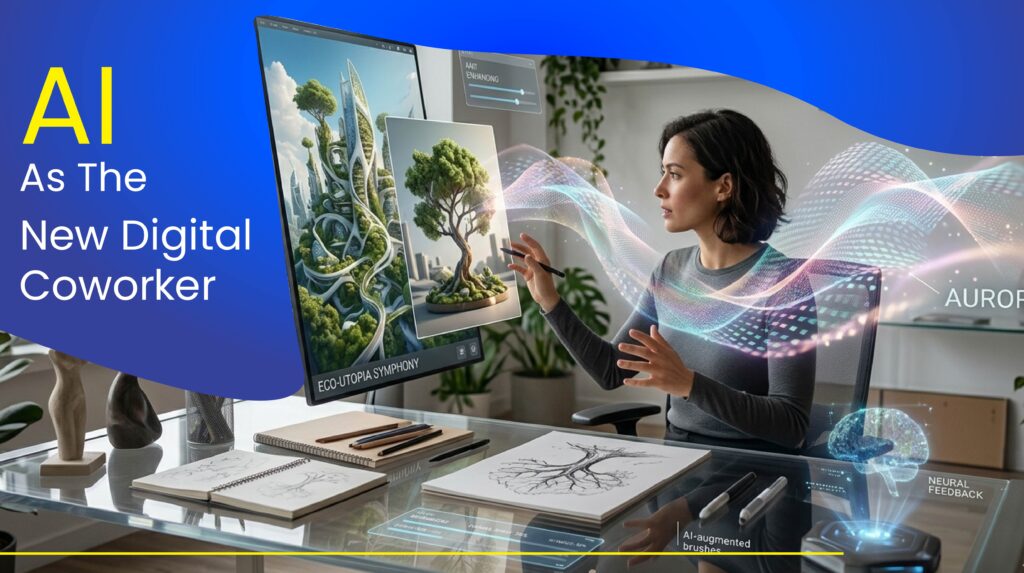
Generative AI has moved from being novelty software to something more like a colleague which drafts, analyses, and verifies work alongside employees. Marketers are using AI assistants to help evaluate campaign performance and draft social copy. Developers have also begun using coding assistants to offer potential functions for upcoming tasks as well as find bugs in their previous work.
One of the takeaways that is often lost in coverage of AI adoption is that the usage of AI tools is not universal across all demographics. Gallup’s Q4 2025 workforce survey indicates frequent AI usage (at least a couple of times a week) is accelerating most quickly for leaders while lagging considerably for frontline workers and individual contributors, a phenomenon that BCG has referred as “the silicon ceiling”. The gap between how quickly AI tools are being adopted for leaders and how quickly frontline workers are adopting them continues to grow.
How Fast Is Adoption Really Growing?
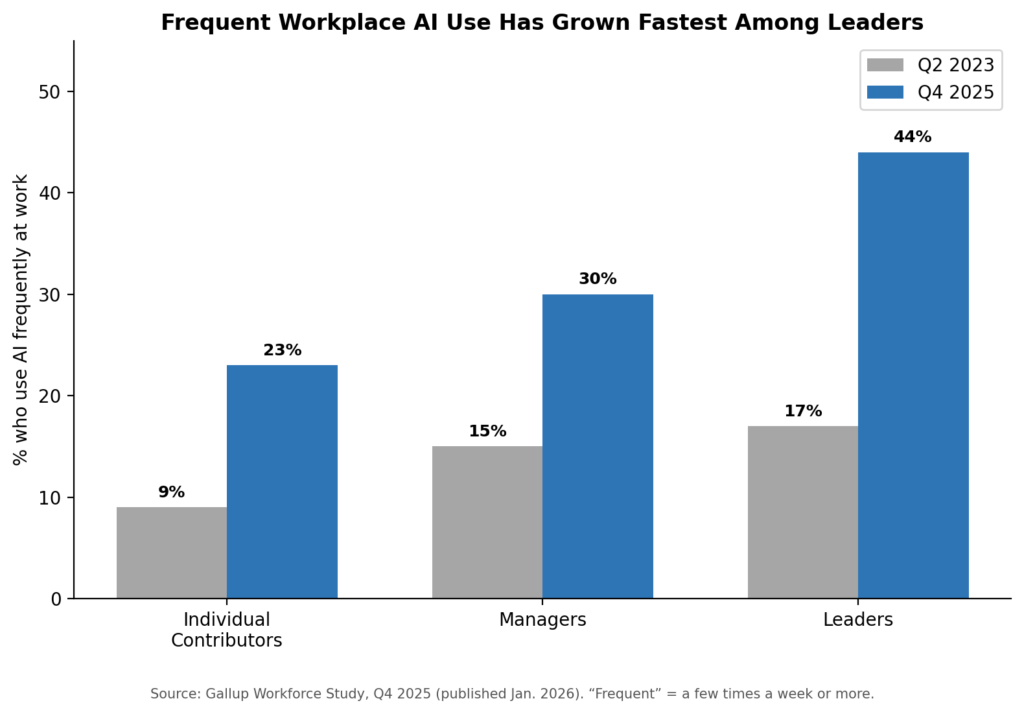
Frequent AI use has roughly tripled among individual contributors since 2023, but leaders still use it almost twice as often. Source: Gallup Workforce Study, Q4 2025.
Other survey results support this uneven growth of AI usage, though the exact nature of that disparity between different types of employees remains unclear. Pew Research Center‘s survey indicated that 20% of American workers were using AI as part of their job duties in late 2025, while McKinsey’s more global survey suspected a full 91% of employees at least have access to one AI tool at their respective employers, this gap illustrates that there is a difference between when an employer purchases a license for AI software compared to whether or not an individual employee utilizes an AI tool on an everyday basis.
Automation of Repetitive Tasks
Data entry, scheduling, document summarising, and posting of invoices will all be good uses for workplace AI going forward. AI tools are already being used by accounting teams to identify issues with a company’s financial transactions prior to making their end-of-year reporting. AI is now being used in many areas of Human Resources to help find and screen resumes and set up interviews, as well as to manage or process new hire paperwork.
The caveat to all of this is that in many cases, an individual still must review what their co-workers or employees generated from the AI-based automation. A workplace survey from a Founders Report in 2026 found that nearly 57% of managers have repaired or had to redo the work of their fellow employees due to relying on the automated output produced by AI, compared to 38% of individual contributors who reported having to redo or repair the output of their co-worker’s automated work. The time that is spent reviewing the quality of work created via workplace AI is often an additional expense that the company does not credit towards any of its productivity gains.
Read more: Best Digital Products to Sell Online in 2026
Smarter Decision-Making Through Data

AI-driven analytics now help retailers forecast demand, healthcare providers flag treatment patterns in patient data, and financial firms screen transactions for fraud. The pitch is consistent across industries: large, messy datasets get turned into patterns a manager can act on instead of guess at.
Results vary by how mature the deployment is. Gartner’s research on generative AI adoption found that only about 9% of organisations met its bar for “AI maturity,” and nearly half of organisations cited difficulty proving ROI as their top obstacle — a reminder that dashboards and pilots are easier to stand up than measurable decision-quality improvements.
The Rise of AI-Enhanced Creativity
While writers utilize artificial intelligence to develop concepts and complete drafts more quickly, designers utilize AI imagery to create concepts for design projects faster, and video editors utilise AI to prepare rough cuts of edited video as well as provide automatic subtitles for video.
The case argues that creative professionals do not view AI as replacing creativity; rather, they see AI as taking away the tedious tasks associated with producing creative output, thereby freeing up time to use their editorial judgment (which cannot be performed by a machine).
Remote and Hybrid Work Powered by AI
Artificial Intelligence (AI) now plays an important role in reducing the coordination burden in distributed teams by summarising meetings; pulling out key items that need action; providing translation services for multilingual conversations; and identifying potential risks to deliverables prior to the deadlines being missed. Overall, these functions help decrease the number of live status meetings needed between teams that are located in various time zones.
Microsoft, Google, and Anthropic have built-in functioning AI meeting support capabilities into their workplace product suites by 2026, instead of providing those features as separate add-on products. The result has led to “meeting AI” being one of the most consistently adopted use cases for AI in the Workplace across organisations of every size.
New Jobs and Skills Emerging
Roles that barely existed five years ago are now standard job postings: AI trainers who fine-tune models for specific industries, prompt engineers who design reliable instructions for AI in the Workplace systems, AI ethics specialists who review deployments for bias and compliance risk, and data analysts who interpret AI-generated output.
- AI trainers – industry-specific model fine-tuning and evaluation
- Prompt engineers – designing reliable, reusable instructions for AI systems
- AI ethics specialists – reviewing deployments for bias, privacy, and compliance risk
- AI-output data analysts – interpreting and validating AI-generated findings
AI literacy is increasingly treated the way basic digital literacy was a decade ago: not a specialist skill, but a baseline expectation across roles.
Read More: Digital Wellness Tips to Stay Focused in 2026
What AI Workplace Tools Actually Cost in 2026
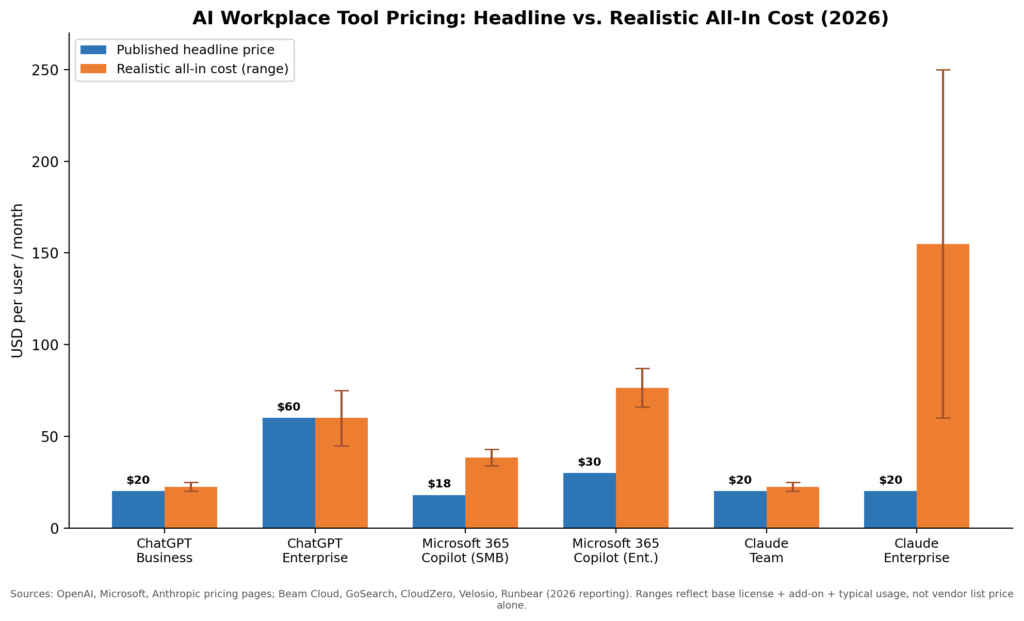
Vendor homepages tend to lead with the smallest possible number. The real cost of deploying AI across a team is usually the headline seat price plus a required base license, plus usage that scales with how heavily the tool gets used. The chart and table below separate the two.
| Tool | Entry / Team Tier | Enterprise Tier | Key Caveat |
|---|---|---|---|
| ChatGPT (OpenAI) | Business: $20–$25/user/mo, 2-seat min | ~$45–$75/user/mo, negotiated, 150-seat min | Enterprise pricing isn’t published — it’s sales-negotiated |
| Microsoft 365 Copilot | $18–$21/user/mo add-on (SMB, ≤300 users) | $30/user/mo add-on; true all-in $66–$87/user/mo with base license | Requires an eligible M365 base license — it cannot be bought standalone |
| Claude (Anthropic) | Team Standard: $20–$25/seat/mo, 5-seat min | $20/seat base + usage billing; often $60–$250+/user/mo in practice | Enterprise shifted to usage-based billing in 2026 — the seat fee is a floor, not a ceiling |
| Google Gemini | Bundled into Workspace Business tiers, no separate add-on fee | Included across Workspace Business/Enterprise tiers, ~$7–$22/seat depending on tier | Cheapest path to entry for teams already on Google Workspace |
Comparing the Leading AI in the Workplace Platforms
These four tools dominate workplace AI deployments in 2026, but they are not interchangeable. Each is genuinely best-suited to a different starting point.
| Tool | Best For | Strength | Limitation |
|---|---|---|---|
| ChatGPT | General-purpose teams wanting the broadest model and plugin ecosystem | Largest user base, fastest feature rollout, strong consumer familiarity | Opaque enterprise pricing; heavy users can blow past Business-tier limits |
| Microsoft 365 Copilot | Organizations already standardized on Word, Excel, Outlook, Teams | Deep, native integration across the Microsoft stack | Add-on only — real cost is always base license + Copilot fee |
| Claude | Teams prioritizing long-document analysis, coding accuracy, and compliance auditability | Strong reasoning and coding quality; contractual no-training guarantee on Team/Enterprise | Enterprise usage-based billing makes monthly cost harder to predict |
| Google Gemini | Workspace-first teams wanting AI without a new vendor relationship | Lowest incremental cost if already paying for Workspace | Capability set is tied to Google’s release cadence inside Workspace, not a standalone roadmap |
Honest Pros and Cons of Bringing AI Into Your Workflow
Pros:
- The ability to measure how much time will be saved by using AI to automate tasks that are repetitive and clearly defined (e.g., summarise, build schedules, create first drafts)
- The ability to quickly identify trends in large data sets that would take an analyst much longer to find
- Employees will have a lower cost of entry into jobs requiring specialist skills (e.g., basic data analysis, reviewing code).
- Workers are interested in using AI to perform their jobs. In 2026, 68% of employees said they want their employer to use AI tools in the workplace.
Cons:
- There are costs associated with reviewing colleagues’ work that was supported by AI. Almost half of employees surveyed in 2026 stated that they needed to redo another employee’s work who was assisted by AI
- It can be difficult for a business to determine how to calculate the cost associated with using AI in the year 2026 due to the lack of a consistent pricing model. This makes it difficult to estimate the monthly costs associated with utilizing AI.
- Not all employees are drinking the AI Kool-Aid. The usage of AI tools within the employee population has significantly lagged behind that of management and executives.
- Many employees are using AI tools outside the support of their employer’s IT department, creating a high level of risk to the business in terms of data access and security.
In 2026, many businesses reported that they were not able to determine whether they are gaining a return on their investment from AI tools, and many businesses report that proving the value of AI was the primary hurdle to adopting AI tools.
What Teams Report in Practice
Rather than offer a single, unverifiable anecdote, it’s more useful to summarise the consistent patterns showing up across multiple independent 2026 workplace surveys (Gallup, SHRM, Epoch AI/Ipsos, BCG, and Founder Reports):
- Tools get adopted fast for first drafts and summaries, slower for anything customer-facing or high-stakes
- Managers and leaders use AI more, and more confidently, than the employees doing the underlying task
- Teams that pair AI rollout with explicit usage guidance see meaningfully higher trust and adoption than teams that simply hand out licenses
- The time saved by the person using AI is partly offset by the extra review time of the people checking the output – a cost rarely included in vendor ROI claims
If you are evaluating AI for your own team, those four patterns are a more reliable planning baseline than any single vendor case study.
Conclusion
AI is altering how we do our jobs by 2026, but it will happen at different rates and bring both real expenses and benefits. The biggest wins are likely to be found in the most scalable, highly-defined job categories (i.e., repetitive jobs); while the least predictable areas will be those requiring creative thinking and judgement, related to the amount of time an employee needs for reviewing the quality of their work (overhead) may outweigh any arbeidsgewenning.
The most useful takeaway for many organisations will not be to simply implement AI in the workplace; rather it will be about finding the right tools to match a specific task, creating a realistic budget for the total costs rather than just the headline price, and providing front-line employees with training and support so they are as familiar with AI as their leaders have been.
FAQs: How AI Is Changing the Way We Work in 2026
1. How much does AI in the workplace actually cost per employee?
It depends heavily on the tool and tier. Entry-level team plans run roughly $18–$25 per user per month across ChatGPT, Microsoft 365 Copilot, and Claude. Enterprise deployments are typically $45–$90+ per user per month once base licenses and usage are included, and Claude’s usage-based Enterprise billing can push costs higher for heavy users. Google Gemini is the lowest-friction option for teams already paying for Google Workspace.
2. Will AI eliminate jobs by 2026?
Some repetitive functions are being automated, but survey data shows AI is reshaping roles more than eliminating them outright. About a quarter of AI-using employees report it has automated existing tasks, while a similar share report it created new tasks they didn’t do before.
3. Why is AI adoption so uneven across organisations?
Leaders and managers use AI far more frequently than individual contributors, a gap researchers call the “silicon ceiling.” Much of this comes down to access, training, and confidence rather than the technology itself.
4. What Skills Are Needed When Working with AI?
By 2026, it will be critical for professionals to possess skills such as AI literacy, data analytics capabilities, critical thinking skills, proficiency in writing prompts, and familiarity with creative and functional IT tools used to execute AI functions.
5. How does AI support remote and hybrid work models?
The use of AI technologies will assist in the achievement of more effective remote/hybrid models through the use of smart scheduling technology, providing meeting summaries, supporting effective collaborative methods, and allowing teams that work across time zones to stay aligned with one another.
About the Author
Emily Carter is a freelance writer and digital productivity researcher based in the United States. Over the past four years, she’s tested and written about the tools, apps, and platforms that freelancers and remote workers rely on daily, from security software like password managers to the AI tools and side-income platforms that make up the modern freelance toolkit. She writes from firsthand use, not press releases.