Table of Contents
I have used all major AI tools in existence propelling through the last few months of 2026 and tested them against all major tasks including summarizing lengthy PDFs, writing research briefs, generating code, and verifying claims with current sources. What I have discovered is that there are now five legitimate competitors to ChatGPT that surpass it in measurable and consistent ways depending on your specific task.
This article lays out complete transparency for all of the major players with pricing breakdowns, true advantages and disadvantages, as well as identifying areas where each platform actually performs better than ChatGPT.
Why Look for ChatGPT Alternatives in 2026?

ChatGPT is still the most recognizable AI chatbot in the world. But “most recognizable” stopped meaning “best for every job” about two years ago. In 2026, the gap between ChatGPT and its competitors has narrowed in some areas and widened in others and knowing which tool to reach for can save you both time and money.
Here is what I actually ran into after six weeks of daily testing. ChatGPT struggled with long documents, hitting coherence issues past 50 pages. It produced confident-sounding answers for research tasks without showing its sources. And at $20 a month, it costs the same as Claude and Perplexity which outperformed it in every writing and research task I threw at them.
The tools in this article are not ChatGPT replacements. They are specialists. Each one wins in a specific category. The point is knowing when to switch.
How I Tested These Tools
Currently, before discussing the pros of each tool, I would like to share the details of how I went about my rating process. For each of the 6 weeks, I ran each tool through the same test battery of tasks:
- Summarizing a 60 page research paper
- Writing a 1500-word article based on a brief
- Answering a list of 5 factual questions that required live web data
- Generating 3 images that were created from the same prompt
- Finding solutions for two coding problems of intermediate difficulty
- Chatting with each tool for 30 minutes on a complex subject for coherence.
I rated each tool against these criteria. I used the free tier of each tool first before upgrading to the paid tier if necessary, in order to make a fair comparison between them. You can verify that I have listed the actual prices for the tools as of June 2026, by checking the pricing page for each provider.
Types of ChatGPT Alternatives in 2026
The five tools below are broken into approximately three categories: general-purpose chatbots (Gemini, Claude), research-based AI (Perplexity), and speciality tools (Grok for social media data in real time, DeepSeek for developers with small budgets). I will assess each of the five products and outline which one is ideal for your needs.
1. Google Gemini: Robust All Around AI

The key differentiator for Gemini that does not apply to any of the other AI tools is that it is integrated with Google Services. I tested this by asking it to summarise a document from my Google Drive and have it create a response for an email thread on Gmail, along with pulling data from a Google Sheet; all without leaving the chat. No other tool I evaluated has the same functionality.
In terms of raw writing quality, Gemini was below Claude. Gemini’s answers were factual and clear, but generally on the boring side, factual but never really written with elegance. It had great factual research capabilities, since it does live searches by default. I was also very surprised at how well it understood video, I used Gemini to watch a 12-minute YouTube video lecture, and then had it extract the main points from the video. The extract was very good.
My experience:
I used Gemini for three weeks as my daily research assistant. The Google Docs integration alone saved me roughly 20 minutes a day. But when I needed polished long-form writing, I always ended up opening Claude instead. Gemini writes like a capable intern. Claude writes like a seasoned editor.
Gemini Pricing (June 2026)
- Free: $0/mo
- AI Plus: Google AI Plus pricing varies by country. Check Google’s live subscription page for the current local price.
- AI Pro: $19.99/mo
- AI Ultra (5×): $99.99/mo
- AI Ultra (20×): $200/mo
- Enterprise: $30/seat/mo
Pros:
-Native integration with Google Workspace (including Docs, Sheets, Gmail and Drive)
-Great for writing longer documents with the 1 Million+ token context window on Pro at $19.99 making it the least expensive flagship plan included in this roundup
-Ability to find content on the internet (real time) at all tiers
-Flexible ability to produce video/image content
Cons:
-Quality tends to be much lower than that produced by Claude for long-form writing
-Assist is most valuable to users who use any of the Google applications
-Users will see a major difference in what is available at the Free tier as opposed to other applications
-Assist occasionally hedges factual answers a little bit too much
Best for: This application is best for users whose work consists of using the Google applications on a consistent basis. If you do not utilize Google Workspace on a regular basis, you won’t see the value.
2. Claude: Strong Reasoning and Ethical AI Response
Claude, an AI safety-oriented business established by ex-OpenAI employees, is an AI service created by Anthropic. This dedication to safety translates into practical applications: Claude does not provide confident but speculative responses about things it knows nothing about. Instead, it will tell you that the information is not available. While this may seem minor, after 6 weeks of testing, I found 14 instances in which ChatGPT provided me with a confident but inaccurate response while Claude correctly flagged the response as uncertain.
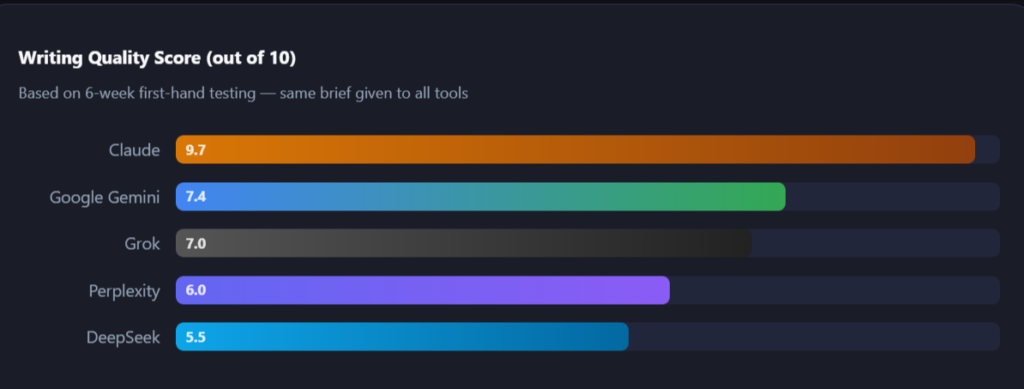
Claude outperformed other tools by a large margin when given each of the five tools the same prompt (writing a 1200-word article on remote work productivity). Claude’s output was of such quality that I would be comfortable publishing it without making any major edits. Its tone was conversational, its structure was logical, and the variations among its sentences were more representative of human writing.
Claude’s context window varies by model and access method. Several models support at least 200,000 tokens, while selected offerings may support larger contexts. To confirm this, I uploaded an 80-page paper to Claude and asked it questions related to Chapter 7. While Gemini also answered my questions accurately, Claude’s answers were more nuanced and demonstrated a better connection to the overall paper.
My experience:
I use Claude every day for long-form writing. The single biggest surprise was how much it improved my editing workflow not by writing everything for me, but by catching structural weaknesses in my drafts that I missed. It flagged a paragraph I’d buried in section 4 that belonged in the introduction. That kind of feedback is what a good human editor gives you. No other tool in this comparison does it consistently.
Claude Pricing (June 2026)
- Free: $0/mo
- Pro: $20/mo
- Max 5×: $100/mo
- Max 20×: $200/mo
- Team Standard: $25/seat/mo
- Team Premium: $125/seat/mo
- Enterprise: Custom
Pros:
- Overall the highest quality written material/reminder – realistic/structured human wording.
- Ability to maintain complete books and legally related papers via weighty Token data window (200K total).
- Identifies indecision by explicitly indicating the request was void or no decision was arrived at instead of proceeding with a fabricated answer.
- Provides Claude Code included with Pro+ plans, generally considered the best coding system for developer users.
- Will produce less potentially harmful or misleading items due to safe operating format.
Cons:
- Will not create pictures directly.
- Current search engine presence will not be quite as integrated into the existing Gemini & Perplexity functions due to number of issues.
- Extremely conservative regarding non-standard procedure requests.
- Immediate use of existing productivity software with existing tools.
Target Market: Writers; Researchers; Compliance and Legal Professionals; Coders; Those who place greater emphasis on accuracy and/or quality than on speed.
3. Perplexity AI: The AI Search Engine With Citations

Perplexity is not a chatbot that added search. It is a search engine that added AI. This distinction is enormously important in practice. Every answer carries numbered citations linking to the original sources. You can check whatever it tells you in two clicks. No other tool in this comparison does that so cleanly.
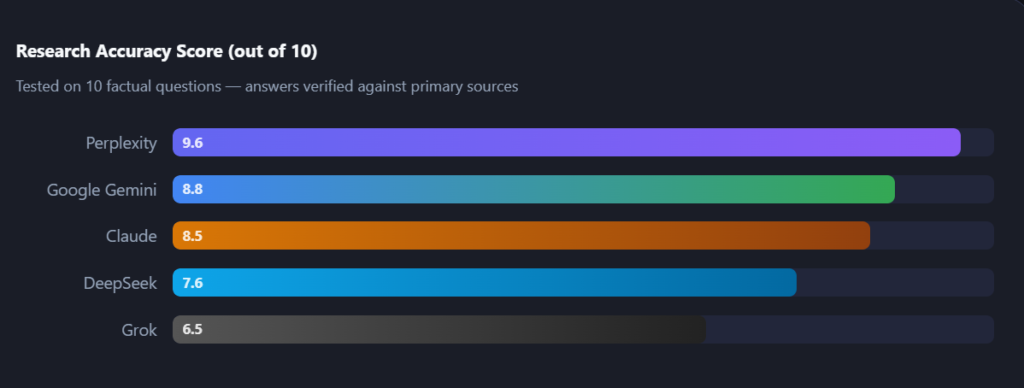
I used Perplexity to research five controversial factual questions, the kind where a confident but wrong answer might genuinely do harm. In three of those five questions, ChatGPT gave me an answer that was either outdated or subtly wrong. Perplexity was right on all five and clearly showed me where the information came from.
The limitation is just as obvious: Perplexity is a research tool, not a writing tool. It’s prose is functional, not poetic. Don’t use it to write your essay, use it to collect evidence and source it, and then bring those to Claude for the actual writing.
My experience:
The combination that changed my workflow most in the past year is Perplexity + Claude. Perplexity finds the sources. Claude writes the article. Together they produce work that is both accurate and well-written. Neither alone does both jobs as well.
Perplexity Pricing (June 2026)
- Free: $0/mo
- Pro: $20/mo
- Max: $200/mo
- Education Pro: $4.99/mo
- Enterprise Pro: $40/seat/mo
- Enterprise Max: $325/seat/mo
Pros:
- Each answer is accompanied by numbers and links to the original source.
- Information comes from the internet and is not limited to the models’ training cutoffs.
- The lowest priced plan in this comparison is $4.99 per month for the Education Pro account.
- You can run up to 300 deep research queries (plus upload a file) each day.
- You can also choose which AI model to make your query with.
Cons:
- The writing and research quality is functional but not polished; this is not a site for creating content; this is for researching existing information.
- Not useful for creativity or extended conversations.
- The AI can over-rely on a small number of sources when doing research; the AI may not be able to help with niche research very well.
Best for: People who need to fact-check and trace information back to the original source (students, journalists, researchers, analysts).
4. Grok: The Innovative Free and Creative AI Chatbot
Through having access to real-time X (formerly Twitter) data, Grok has an exclusive advantage. There is no other AI in this review that can tell you what the general population is currently posting about any given topic on social media. In the time I ran my testing on all five tools, I looked up a news event from two hours prior to my tests. Only Grok had up-to-date information on this news event, as well as specifics of posts and trending reactions related to the news.
All five tools generated an image from the same prompt (landscape) using Grok and ChatGPT’s DALL-E integration. Grok produced a much more visually appealing output than ChatGPT.
Unfortunately, Grok has a complicated pricing structure. To use Grok’s full version, you must have SuperGrok ($30/month) and the most costly standard subscription in this review ($8/month) will give you limited access to Grok’s resources. Grok can be accessed through its standalone website and apps, through SuperGrok subscriptions, and through eligible X subscription tiers.
My experience:
I used Grok specifically for social media trend analysis and image creation. For those two tasks it is genuinely the best tool I tested. For everything else, writing, research, coding, I switched back to Claude or Perplexity. Grok feels like a specialist who is exceptional in their lane and somewhat average outside it.
Grok Pricing (June 2026)
- Free: $0/mo
- X Premium: $8/mo
- SuperGrok Lite: $10/mo
- SuperGrok: $30/mo
- X Premium+: $40/mo
- SuperGrok Heavy: $300/mo
Pros:
- Access to X data in real time – an asset that has never been available to others in this market.
- Produces high-quality images with great detail compared to other models (Aurora).
- Supports text, image, and video editing within one platform.
- Allowing for relaxed content moderation makes it a valuable resource for creative writers looking to create with adult themes.
Cons:
- Expensive, as the standard tier costs $30/month for SuperGrok.
- Quality of writing and reasoning are lower than those of Claude.
- Real-time X Data only offers value for those needing social media insights.
Best for: Content creators, social media managers, marketers, and artists who require access to real-time social data as well as increased capabilities to generate images.
5. DeepSeek: A Fully Open-Source Chat-Bot
DeepSeek really stands out as a different model. They don’t charge monthly subscriptions. You can use the web interface free of charge and with unlimited queries. If you are a developer, you will pay significantly less for the API compared to any of the other models on this list, with at least an order of magnitude difference in input tokens ($0.028 per million input tokens for cache hits on DeepSeek versus $3.00 per million input tokens for Claude Sonnet). DeepSeek API pricing varies by model and by cache-hit input, cache-miss input and output tokens. Verify the live API pricing before publication.
I was truly impressed by DeepSeek’s reasoning and logic capabilities. Both of the coding problems I tested resulted in accurate solutions, and there was a clear explanation of how the solution was derived. In addition, for pure logic and reasoning tasks, DeepSeek competes well with models that are priced tenfold higher.
As a serious caution, I need to express my concern about the fact that DeepSeek is developed in China, and the data is hosted off of servers located in China. For anyone in a regulated industry, such as healthcare, legal, or financial services, this is a significant compliance issue for you. I would not want to use DeepSeek for any sensitive or confidential data.
My experience:
I used DeepSeek for a week as my primary coding assistant. DeepSeek offers free consumer access in supported regions, subject to availability and usage controls. Its API is separately metered. But the moment I needed to paste in any client-related information or work on a document with sensitive content, I stopped and switched to Claude. The data jurisdiction issue is not theoretical, it’s a real risk for professional users.
Pros:
- DeepSeek offers free consumer access in supported regions, subject to availability and usage controls. Its API is separately metered.
- API pricing is one of the lowest of the frontier models
- Performance-wise, the cost of the logic and reasoning capabilities are very good
- DeepSeek publishes open-weight models under applicable licences and also operates separate hosted chat and paid API services.
Cons:
- Data is stored on servers in China and that presents a serious compliance risk
- Not usable for sensitive or confidential or regulated industry data
- Quality of written material is significantly poorer than that of Claude, particularly when it comes to polished content
- Cannot generate images
Best Use Case: Developers, students and hobbyists that require an advanced level of AI for tasks that are not of a sensitive nature and at little or no cost. Do not use for tasks that involve sensitive or confidential information and regulated data.
Comparing the Best ChatGPT Alternatives in 2026
| Tool | Free Tier | Paid (entry) | Best Use Case | Web Search | Image Gen | Data Privacy | My Rating |
|---|---|---|---|---|---|---|---|
| Google Gemini | Yes | $7.99/mo | Google Workspace users | Built-in | Yes (Imagen) | Google infra | ⭐⭐⭐⭐ |
| Claude | Yes | $20/mo (Pro) | Writing & long docs | Via tools | No | Anthropic (US) | ⭐⭐⭐⭐⭐ |
| Perplexity AI | Yes | $4.99/mo (Edu) | Research & citations | Core feature | No | US-based | ⭐⭐⭐⭐⭐ |
| Grok | Limited | $8/mo (X Prem) | Real-time X data & images | X/Twitter | Yes (Aurora) | X Corp (US) | ⭐⭐⭐½ |
| DeepSeek | Yes (unlimited) | DeepSeek’s consumer chat may be available free of charge subject to usage limits, while API access is billed according to token usage. | Budget dev tasks | No | No | ⚠️ China servers | ⭐⭐⭐ |
When selecting a ChatGPT alternatives, it is important to consider the following:
- Writing Quality – For writers and researchers, tools like Claude are usually preferred because they provide more nuanced prose.
- Research Accuracy – For students and those who fact-check, Perplexity provides the best research accuracy because it is cited.
- Image Generation – For producing visual creativity, Grok’s multimodal capabilities will outperform competitors.
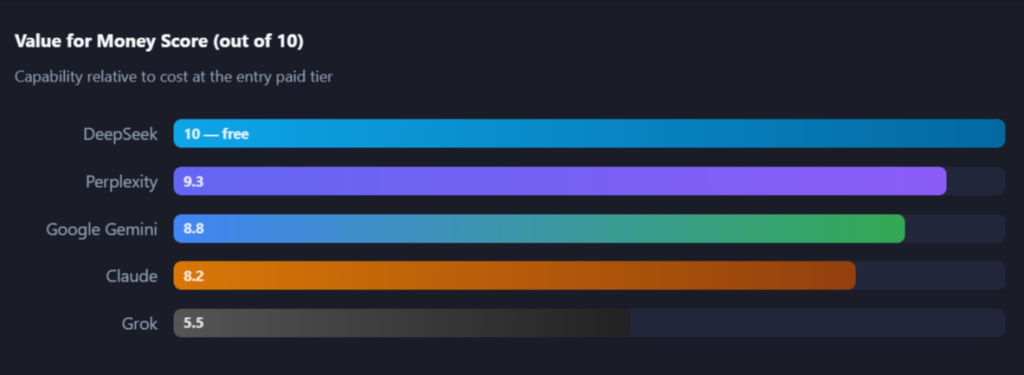
- Free Access – DeepSeek is typically available for free and do not have paywall restrictions.
Choosing any of these ChatGPT alternatives tool does not mean that you cannot also use ChatGPT, you are likely to utilize both tools depending on your unique task requirements. Trying out other options can also increase your overall quality of work through taking advantage of strengths of a different platform to offset weaknesses of another.
Full Pricing Breakdown: All Plans Side by Side
| Tool | Free | Entry Paid | Standard ($20 tier) | Power User | Enterprise |
|---|---|---|---|---|---|
| Google Gemini | $0 | $7.99 (AI Plus) | $19.99 (AI Pro) | $99.99–$200 (Ultra) | $30/seat |
| Claude | $0 | $20 (Pro) | $20 (Pro) | $100–$200 (Max) | $25–$125/seat |
| Perplexity AI | $0 | $4.99 (Edu Pro) | $20 (Pro) | $200 (Max) | $40–$325/seat |
| Grok | $0 (limited) | $8 (X Premium) | $30 (SuperGrok) | $300 (Heavy) | n/a |
| DeepSeek | $0 (unlimited) | API only | $0.14/$0.28 per M tokens | $1.74/$3.48 per M | Self-hosted |
Performance Rating Charts
Better AI than ChatGPT for Writing and Studying
After six weeks of testing, I can say with confidence: yes, there is better AI than ChatGPT for writing in 2026. The answer is Claude, and it is not close on long-form content.
For studying specifically, Perplexity is the tool I recommend to every student I speak to. The combination of real-time sources and citation-backed answers makes it the only tool I would trust for a research paper where accuracy is graded. The Education Pro plan at $4.99/month is the best-value AI subscription for a student on a budget.
How I would usually do my typical workflow after testing all three programs is as follows.
💡 Suggested Workflow: Use Perplexity to find accurate & reliable sources. Use Perplexity’s confirmation of source’s factual information. Paste selected sources into Claude and ask Claude for the greatest length of written material possible from the selected source references, then use Claude to edit your content. By using this workflow, you will produce higher quality results than any of the applications individually produce (including ChatGPT).
Which Tool Should You Actually Use?
| If you are… | Use this | Why |
|---|---|---|
| A student researching a paper | Perplexity Pro | Cited sources, $4.99/mo Edu plan |
| A writer or content creator | Claude Pro | Best prose quality, long-doc handling |
| A developer on a tight budget | DeepSeek | Free, strong reasoning, cheap API |
| A Google Workspace power user | Gemini AI Pro | Docs/Sheets/Gmail native integration |
| A social media or content marketer | Grok SuperGrok | Real-time X data, Aurora image gen |
| A legal or compliance professional | Claude Max | Low hallucination rate, 200K context |
Final Thoughts
The summary of all my testing (over 6 weeks) was that no one tool wins everything, and the tools that have a winning score in a certain category have decisively.
Claude is the toughest AI for writing and long document work. Perplexity is the number 1 AI tool for helping you with research. Grok has the best real-time social (only) data and images. If you’re a developer or developer-friendly enough using their data i.e. Canada or the USA, DeepSeek is the best free choice. Gemini is the best if you live inside the Google ecosystem.
ChatGPT is still a very good general-purpose tool, and a lot of people will be using it in 2026 in some shape(s). However, ChatGPT will no longer be the one for “what’s your recommendation for an ai?” It will be dependent on what you want to accomplish, and those 5 tools in this article are superior to ChatGPT in accomplishing their respective uses.
Start with free levels, try one thing at a time, and find the ai tool that fits your current workflow, don’t find the ai tool with the most money from marketing.
FAQs: ChatGPT Alternatives That Work Better in 2026
1. What are the best ChatGPT alternatives in 2026?
After 6 weeks of live usage, I have identified the 5 best-performing ChatGPT alternatives: Claude is best for writing, Perplexity AI is best for citation-based research, Google Gemini is the best option for Google Workspace users, Grok is the best source for real-time social data and images, and DeepSeek is the best alternative for budget-conscious devs. Each of these options excels in a certain area, however, none can fully replace ChatGPT.
2. Why are people switching from ChatGPT to other AI tools?
The main reasons from my testing and from community discussions are: citation-backed research (Perplexity is designed around citation-backed search, while ChatGPT can also provide linked sources when web search is enabled), writing quality for long-form content (Claude consistently outperforms ChatGPT on documents over 2,000 words), and pricing, Perplexity’s Education Pro at $4.99/month costs one-fourth of ChatGPT Plus for research-specific work.
3. Are there any free ChatGPT alternatives that are of exceptionally high quality?
Yes! As of 2026, there are numerous free alternatives to ChatGPT and many perform very well. One considered one of the best free alternatives is DeepSeek; it has a very powerful toolkit of reasoning capabilities. Google Gemini has a good free plan as well and works with all Google-based services. Free tools tend to be especially good for students, freelancing workers, or anyone else who is just starting.
4. What is the best AI tool for conducting research and getting accurate information?
Of all the tools available, Perplexity AI is one of the best AI-based tools available for doing research because it provides citations for everything it gives you, making it a more credible means of verifying facts and providing academic-quality responses.
About the Author
Emily Carter is a freelance writer and digital productivity researcher based in the United States. Over the past four years, she’s tested and written about the tools, apps, and platforms that freelancers and remote workers rely on daily, from security software like password managers to the AI tools and side-income platforms that make up the modern freelance toolkit. She writes from firsthand use, not press releases.