Table of Contents
My first paid freelance project was a $40 blog post for a client I found on Upwork, and it took me nearly four hours to write because I had no idea what I was doing yet. I remember being far more nervous about that first project than the tenth or the fiftieth. Looking back, the fear wasn’t really about skill; it was about not knowing what the first few weeks would actually look like, or what the platforms would actually charge me once I started earning.
This guide is the version of that answer I wish I’d had: the real mechanics of Upwork and Fiverr, honest numbers on what beginners should charge, and a first-client timeline that isn’t dressed up to look faster than it usually is.
Understanding Freelancing with No Experience: Shifting Your Mindset

People often think clients will select a freelancer based on their resume; this is not true; freelancers are hired for their ability to address a client’s unique need, at an acceptable cost and delivered on a timely basis. A solid portfolio is a better proof of this than years of unrelated work history.
If you have experience in writing compelling content, designing a good logo, video editing, social media management or basic web design, then you already possess an item you could include in your billable hours. Many people do not consider these skills valuable since they were gained through school, as hobbies or through personal projects (e.g. an Instagram account) and not by virtue of having the title of “employee”.
To clarify what is actually the important distinction: not having experience as a freelancer does not equal not having any skills as a freelancer. You may not have a history of working with clients, but that is not indicative of your abilities; the history of your client experiences starts as soon as you take on your first project – no matter how small.
How to Start Freelancing with No Experience Online
Since freelance work is remote by default now, “online” is really just “freelancing” for most beginners. The sequence that actually works:
- Pick one service you can deliver well today – writing, graphic design, social media management, basic video editing, virtual assistance, or data entry are the most beginner-accessible starting points.
- Build 3–5 sample projects before you have a client. Write mock blog posts, design a logo for a fictional brand, edit a sample reel. Clients evaluating your portfolio generally don’t ask whether you were paid for it; they are judging the work itself.
- Choose a platform and commit to it for at least a month. Upwork and Fiverr are still the two biggest on-ramps for beginners, but they work in genuinely different ways, and the difference affects your first few weeks more than most guides mention.
Upwork vs. Fiverr: Fees Compared (2026)
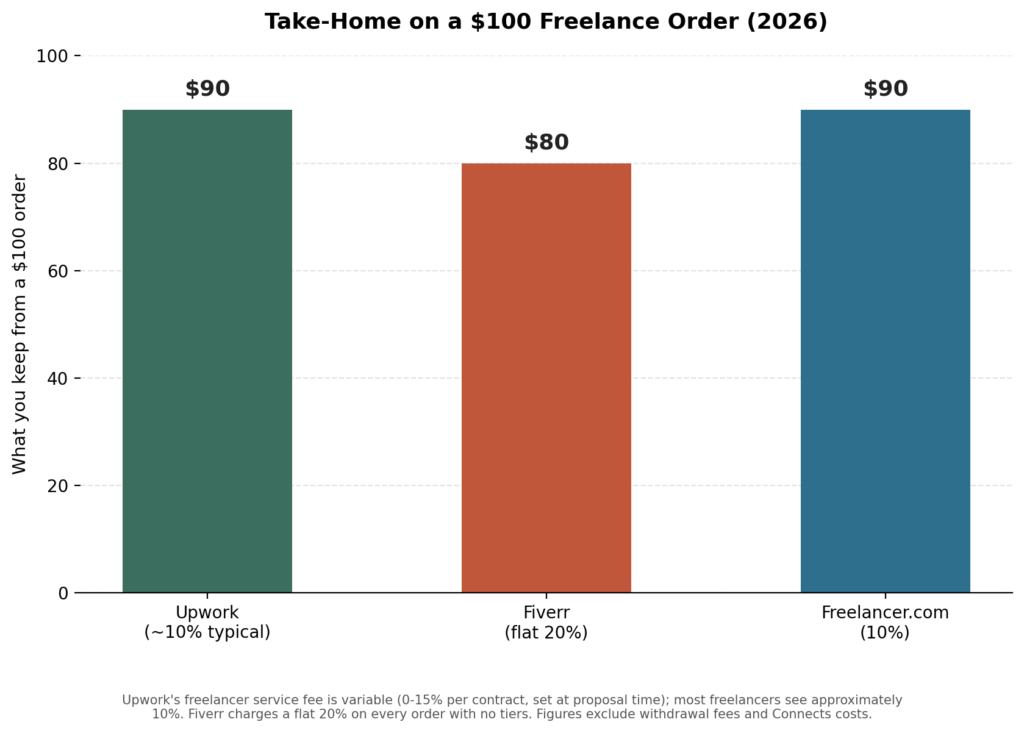
| Platform | Fee Structure | On a $100 Order, You Keep | How You Get Work | Best For |
|---|---|---|---|---|
| Upwork | Variable 0–15% per contract, set when the proposal is sent; most freelancers land around 10% | ~$90 | You browse job posts and submit proposals (costs Connects — see below) | Ongoing contracts, hourly work, higher-budget projects |
| Fiverr | Flat 20% on every order, including tips — no tiers, no exceptions | $80 | You list “gigs” at fixed prices and buyers come to you | Fixed-scope, one-off deliverables; passive discovery once you rank |
| Freelancer.com | 10% (varies by project type) | ~$90 | Bid on posted projects, similar model to Upwork | An alternative bidding pool with somewhat less competition |
The fee gap is only half the story. Upwork also charges you to apply; Fiverr doesn’t.
The Hidden Cost of Applying: Connects vs. Gigs
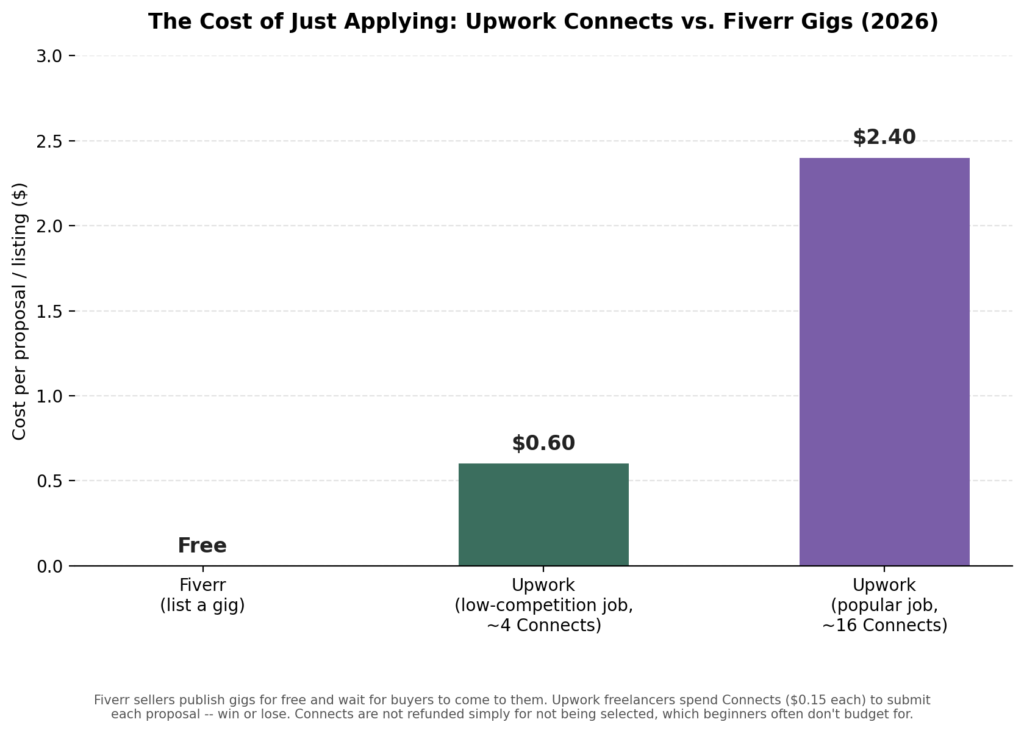
Fiverr sellers list gigs for free and wait for buyers. Upwork freelancers spend Connects to submit each proposal, win or lose.
Upwork requires “Connects” to submit a proposal; they cost $0.15 each, and most jobs require 2–16, depending on competition and budget. Free Basic accounts get 10 Connects a month; Freelancer Plus ($19.99/mo) includes 100. Connects are not refunded just because you didn’t get selected, which is the detail that catches most beginners off guard: if you send 10 proposals at 6 Connects each before landing your first job, that’s 60 Connects, about $9 spent, before you have earned a cent.
Fiverr flips this entirely: you publish a gig once, for free, and buyers who search find you. The trade-off is you have far less control over who finds you, or when your first sale might take a week or might take two months, largely dependent on Fiverr’s search algorithm and how well your gig is optimised.
My honest take, having used both: Upwork got me my first client faster because I could actively pursue jobs that matched my skill, but I spent real money on Connects along the way. Fiverr took longer to get initial traction, but once a gig started ranking, the sales came in with far less ongoing effort from me.
How to Start Freelancing as a Student

Taking on freelance work while attending school has advantages; the downsides are generally lower than taking on a full-time job, and when you take on freelance work, you are building an income rather than replacing your current income. Also, taking on freelance work while attending school allows you to learn things that don’t typically appear in a syllabus, such as how to negotiate pricing/scope/deadlines/how to deal with a client who goes silent during a project.
Start small with 3-5 hours a week on a set budget (and use winter break or spring break to increase). You can typically find freelance work associated with the subject that you’re taking classes in. There are typically sellable skills associated with each major (i.e. creative writing/journalism students can freelance; computer science students can develop websites or debug software; marketing students can manage social media accounts). You are not creating a new skill set; you are pricing out something that you are already developing a skill set in.
Building Credibility Without Experience
The real question beginners are asking is : “how to start freelancing with no experience” and “how do I compete against profiles with 50 five-star reviews?” Here’s what actually works, in order:
- Price competitively, not desperately. Undercutting everyone attracts the most demanding clients for the least money, a pattern that leads to burnout faster than slow growth does.
- Over-deliver on your first 3–5 projects specifically, because reviews compound. A five-star review from client #1 makes client #4 far easier to close than the money from client #1 ever will.
- Build public proof outside the platform. Share process posts on LinkedIn, mini case studies on Instagram, or a short thread breaking down how you approached a project. This does more for buyer confidence than a bio paragraph ever will.
- Take one or two unpaid or heavily discounted collaborations early on, specifically to get a testimonial you can quote elsewhere, not as a long-term pricing strategy, but as a deliberate, time-boxed way to generate proof fast.
A Realistic First-Client Timeline
This is the part most guides skip, and it’s the one people ask me about most. A grounded, non-hyped version looks like this:
- Week 1–2: You are building your profile and 3–5 sample projects. No income yet; this is setup, not failure.
- Week 2–4 (Upwork) or Week 4–8 (Fiverr): Your first proposals go out (Upwork) or your gig starts appearing in search (Fiverr). Most beginners land their first paid project somewhere in this window, but a slower start here is common and not a signal to quit.
- Month 2–3: If you delivered well on the first project, repeat clients or referrals typically start appearing. This is usually when your first genuine review lands, which meaningfully changes how fast the next client responds.
- Month 3–6: With 3–5 reviews and a clearer sense of what you are actually good at, this is the point where raising your rate 15–25% usually doesn’t cost you conversions; buyers are now responding to your track record, not just your price.
I won’t hand you a specific income number for any of these stages; anyone who does with certainty is guessing or selling something. What I can say honestly: the single biggest difference between people who are still freelancing at month six and people who quit at month one is whether they treated the first slow weeks as normal setup rather than proof it wasn’t working.
Beginner mistakes when starting to freelance
- Pricing at rock-bottom to “compete.” It doesn’t attract better clients; it attracts the most price-sensitive ones, and it makes raising rates later feel much harder than it needs to be.
- Copying another freelancer’s profile description word-for-word. Clients read multiple profiles in one sitting — generic, copied language is easy to spot and does the opposite of building trust.
- Quitting after a handful of unanswered proposals. A slow first few weeks is the norm, not a signal the platform or your skill doesn’t work.
- Offering five services at once instead of one clear speciality. A “writer/designer/VA/social media manager” profile reads as unfocused; a “I write email newsletters for SaaS companies” profile reads as an expert.
- Not accounting for Connects or platform fees when quoting a price. If you need $500 in your pocket, on a 10% Upwork contract fee, you need to bill roughly $556; beginners who forget this consistently under-charge without realizing it.
Beginner Pricing Table: What to Charge With Zero Reviews
| Service | Realistic Starting Rate | Notes |
|---|---|---|
| Blog / article writing | $0.05–$0.10 per word, or $30–$75 per 800-word post | Price per project, not per hour, until you know your own speed |
| Basic graphic design (social posts, simple logos) | $15–$40 per design | Bundle 3–5 designs into a package rather than pricing one at a time |
| Social media management | $150–$400/month per client | Charge per platform managed, not a flat blanket rate |
| Basic video editing | $10–$25 per finished minute | Scales quickly once you’re fast — this is often underpriced early on |
| Virtual assistance / data entry | $8–$18/hour | Among the easiest categories to start in, but also the most competitive on price |
These are starting points, not ceilings; they are meant to get your first few reviews in the door, not to reflect where your rate should sit permanently. Reassess every 3–5 projects.
Final Thoughts
You don’t need to feel ready to start freelancing with no experience; you need a skill you can already deliver, a handful of honest sample projects, and a platform you are willing to stick with past the slow first few weeks. Everyone competing with you now, including the profiles with 50 reviews, started at zero exactly the same way.
FAQs: How to Start Freelancing with No Experience
1. Which platform is better for a total beginner: Upwork or Fiverr?
Neither is universally better. Upwork suits people who want to actively pursue specific jobs and don’t mind spending a small amount on Connects to apply. Fiverr suits people who’d rather build a discoverable listing and let buyers come to them, accepting that initial traction can take longer.
2. How much does it actually cost to get started on Upwork?
Technically, $0: Basic accounts include 10 free Connects a month. In practice, most beginners spend a small amount (often under $10–15 total) on extra Connects while sending proposals before landing a first client.
3. Should I take unpaid work to build a portfolio?
Selectively, yes, one or two time-boxed collaborations for a genuine testimonial can be worth it. As an ongoing strategy, no, free work doesn’t teach you to price, negotiate, or manage a paying client relationship, which are the actual skills you’re trying to build.
4. How do I know when to raise my rates?
A reasonable signal is having 3–5 positive reviews and consistently winning projects without your lowest possible bid. At that point, a 15–25% increase rarely costs conversions, because buyers are now responding to your track record rather than just your price.
About the Author
Emily Carter is a freelance writer and digital productivity researcher based in the United States. Over the past four years, she’s tested and written about the tools, apps, and platforms that freelancers and remote workers rely on daily, from security software like password managers to the AI tools and side-income platforms that make up the modern freelance toolkit. She writes from firsthand use, not press releases.