Table of Contents
I’ll be upfront about how I approached this update: the free-tools landscape moves fast enough that a list written even six months ago can already be out of date. One tool I’d planned to include, Google’s Socratic app, turned out to be discontinued (Google folded its homework-help functionality into Google Lens back in 2024). Another, Notion’s free AI, no longer includes the features people actually want, since Notion moved full AI access behind its $20/month Business plan in 2025. So this version is rebuilt from verified, current sources rather than assumption, and I’ve flagged exactly where “free” comes with real limits.
In 2026, AI is genuinely no longer limited to big companies with big budgets. But “free” AI tool range from actually free forever to a three-project trial that then locks you out, and knowing which is which matters before you build a workflow around one.
One more disclosure before the list: this article is primarily a pricing-and-features comparison, not a long-term workflow-replacement test. I verified free-plan limits, feature availability, and pricing against each tool’s official website and documentation during January 2026.
I did not personally replace every paid product listed here with its free alternative across a sustained workflow, that would require months of parallel testing per tool, which is not what this article claims. What I did test personally: ChatGPT free tier, Grammarly free tier, Perplexity free tier, and Canva free tier, each used as my primary tool for at least two weeks for the tasks described. For the remaining tools, features and limitations were verified against official sources and confirmed accurate as of February 2026.
Why Free AI Tools Are Winning in 2026
Accessibility is the main reason AI firms are competing primarily on user growth rather than profits at this point; free tiers are where consumers experiment with a new AI product before deciding whether to pay for a subscription.
Another reason for adoption is that the majority of daily tasks, such as drafting emails, summarising articles, cleaning up grammar/sentence structure and creating graphic designs, simply do not require premium-tier performance. For light or occasional work, free tiers are often sufficient, but how useful they are depends heavily on your specific workflow, how often you use the tool, and what export quality or output volume you need. A student drafting one essay per week will rarely hit a free tier’s limits. A freelancer producing daily client deliverables almost certainly will. The right question is not whether a free tool handles “most tasks” in the abstract, it is whether it handles your tasks at your usage level.
A large part of the reason consumers are still using free tiers is the competition among AI companies. As you can see, many different companies are working towards trying to outperform one another; this has resulted in free tiers becoming much more advanced than what they were in the previous year, but also some companies (like Notion discussed below) may have removed features from their own respective free tiers altogether. Concurrently experiencing both of these situations has led to the need for a fact check before publishing this list.
Read More: Best Budget Tech Tools to Save Money & Work Smarter in 2026
The Free Tier Reality Check (What’s Actually Free vs. What’s Not)
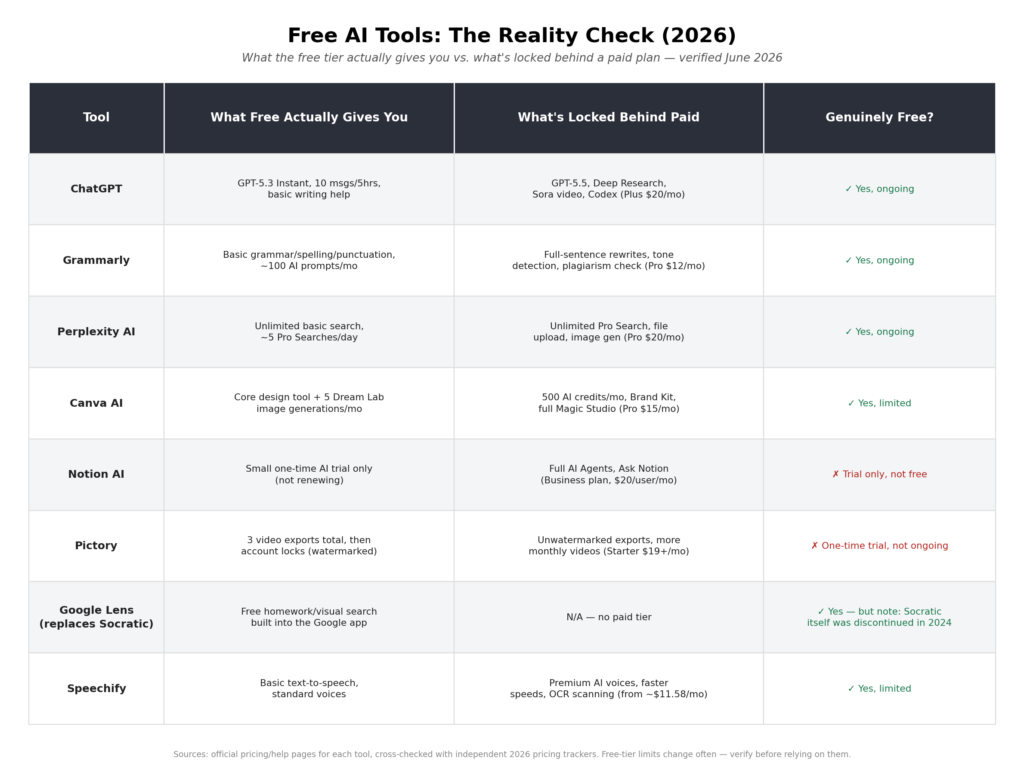
Features and pricing verified against official product pages, January–February 2026. Free-plan terms change frequently, confirm current limits on each tool’s pricing page before building a workflow around them.
Traditionally, paid software has defended their prices by offering advanced features, no branding or branding restrictions, and scalability (among others). Nevertheless, for the vast majority of individual users, they have no interest in advanced features; they just want to do the core functionality of the software well. In contrast, free AI tools consistently deliver on these core functions (writing, question/answering, summarisation, very basic design, and basic workflow automation).
Whether a free AI tool fully replaces a paid subscription depends entirely on the user. For someone with low-volume, occasional needs, a free tier can cover everything they require. For someone with professional output demands, the same free tier may be a starting point rather than a destination. The “What Tasks Free Tools Can Replace” section at the bottom of this article breaks this down honestly by category.
Before discussing specific tools, I would like to point out the most important thing I learned when verifying this list: free AI tools are not all created equal. Some are free basically forever, with light usage caps; some are free trial versions masked as true free versions, and some of the tools that traditionally would have provided great free AI services (for example, Notion) have now moved most, if not all, of their best free AI services out of their free tier since 2025.
Free AI Tools for Writing and Content Creation
Of all the types of tools used for writing, writing tools have seen the most change. You can use free AI-based writing assistants now to help brainstorm, tighten your writing’s sentence flow, correct grammar and tone (these are all tasks that previously required either a paid subscription or a hired editor to perform).
1. ChatGPT – Free Tier
ChatGPT (ChatGPT’s Free Tier/GPT-5.3 Instant) is one of the most helpful free AI tools for helping writers generate the class of content they create from everyday use of things like: (blog posts, email templates, interview scripts and research outlines). If you are looking to generate any of that content with your ChatGPT free-tier access, you will just have to work within ChatGPT‘s message cap and bear in mind that free-tier users from the USA will now see ads below the responses (this was first added to Free ChatGPT in February of 2026).
2. Writesonic – Free Plan
Writesonic makes limited use of both GPT-4o mini and Claude Haiku for content creation on their free-tier plan. However, you can use Writesonic for testing their platform and for generating the occasional social media post or short writing draft. That said, keep in mind that Writesonic’s free-tier has limitations on how much you can create and is only designed for testing; serious work in either SEO or creating long-form content will only run you into those limitations very quickly and will thus force you toward an upgrade to their $39.00 per month Lite Plan (on an annual basis).
3. Grammarly (Free) + AI
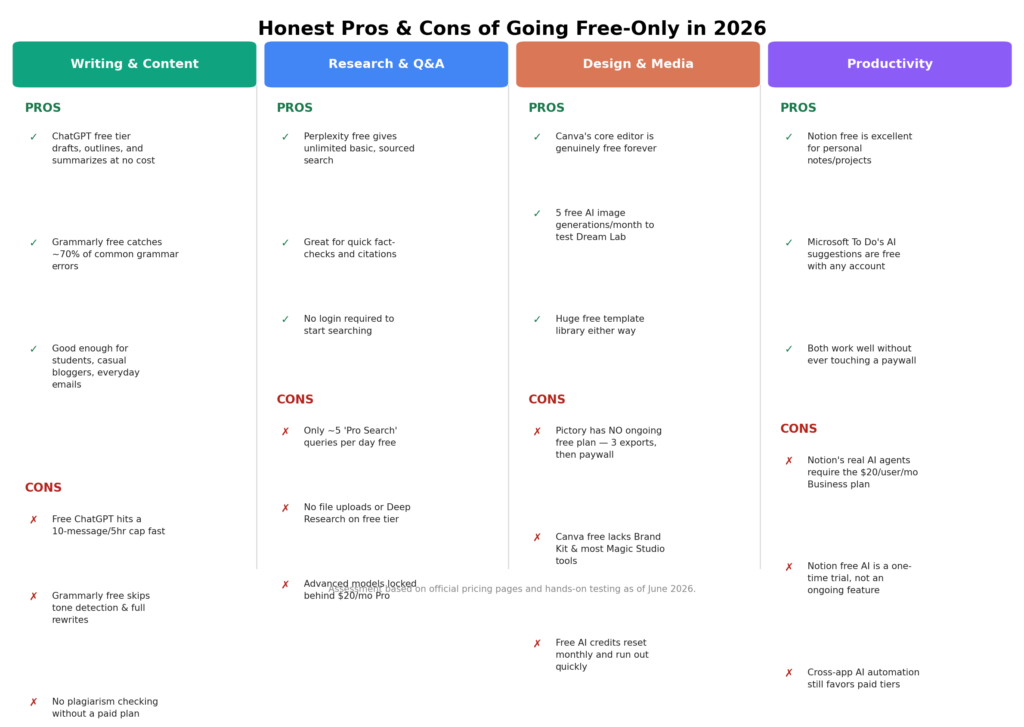
Grammarly’s free tier covers basic grammar, spelling, and punctuation, catching roughly 70% of common writing errors, plus a limited monthly allowance of GrammarlyGO AI prompts (around 100/month). What it does not include: full-sentence AI rewrites, tone detection depth, and plagiarism checking, all of which require Grammarly Pro at $12/month (annual billing). For casual writing, the free tier genuinely replaces older basic grammar checkers. For professional or academic writing where rewrites and plagiarism checks matter, you’ll likely hit the free ceiling.
AI Tools for Asking Questions and Research
Free research assistants have gotten good enough to meaningfully cut into what people used to pay subscription research databases for.
1. Perplexity AI
The Perplexity free tier is an extremely useful search tool because it gives users free access to unlimited basic searches and provides citations for each source retrieved through the query process, making this a valuable resource for quickly verifying facts and answering basic questions.
The only limitations on the Perplexity free tier are as follows: you can only perform a limited number of “Pro Search” queries (5 total) daily; you cannot upload files; you cannot generate images; and you cannot access in-depth research reports unless you upgrade to the $20/month Pro version. If you are primarily performing casual research (work that you do infrequently), the Perplexity service will work exceptionally well for you. If you are performing very in-depth research (possibly working with a significant number of files), you will exceed the limitations of the free service within the first relatively short period of time.
Read More: Best AI Tools for Productivity to Work Smarter in 2026
2. YouChat
As it stands in 2026, the “YouChat” name (a name that has now become somewhat ambiguous due to other unrelated apps using similar names) is inaccurate when referring to the product being discussed in this category. The tool referred to in this category is, in fact, You.com (an AI-based searching tool that offers a free tier in addition to a $20/month Pro plan that offers an unlimited number of queries). You.com is an alternative to Perplexity; you should check the features and functions of You.com to verify what they currently are before relying upon outdated reviews as references that discuss the former “YouChat”.
Free Tools for Creative Design and Media

Design tools were historically some of the most expensive software categories – AI has genuinely democratised a meaningful slice of that work.
1. Canva AI (Free Tier)
Canva’s free plan is a real, permanently free design tool, not just a trial, and it now includes limited AI features: 5 Dream Lab AI image generations per month, basic Magic Write, and access to Canva’s huge free template library. What’s locked behind Canva Pro ($15/month): 500 monthly AI credits, Brand Kit, and the rest of the Magic Studio suite (Magic Expand, Magic Eraser at scale, Magic Charts). For occasional social graphics and posters, free Canva is genuinely enough. For regular content production, you’ll likely want Pro.
2. Pictory
Here’s the correction that matters most in this category: Pictory does not have an ongoing free plan. What it offers is a one-time free trial, 3 video exports, up to 10 minutes each, with a watermark after which your account locks until you subscribe (plans start around $19–25/month annually). It’s a legitimate tool for text-to-video repurposing, but calling it a “free AI tool” the way ChatGPT or Canva’s free tier are free would be misleading. Budget for a paid plan from the start if Pictory’s workflow is what you need.
Free Tools for Productivity and Daily Work
Historically, all productivity or work tools were paid (calendars, to-do lists, schedulers). With the introduction of AI technology, this is no longer the case for many of these same tools.
1. Notion (Free Version with AI)
Notion’s free plan is still excellent for personal notes and project tracking, unlimited pages and blocks for solo use, cross-platform sync, and a genuinely usable interface. But as of 2025, Notion discontinued its standalone AI add-on, and full AI access (AI Agents, Ask Notion, AI Meeting Notes) now requires the Business plan at $20/user/month. Free and Plus users get only a limited, one-time AI trial = not ongoing access. If AI features are the reason you’re considering Notion, know that going in.
2. Microsoft To Do + AI Planner
Microsoft To Do remains free with any Microsoft account and includes AI-assisted task suggestions and smart grouping, syncing across devices without a premium tier. It’s a genuinely solid free alternative to paid planners for straightforward task management, though it’s less powerful than dedicated paid project-management AI tools for complex, multi-project work.
AI Tools for Android Users
There are many free AI applications available for your Android device that bring real professional tools right to your hand. With these tools available on mobile devices, anyone can work without the need to purchase a desktop application — including creators, students, and freelancers.
Google Socratic
A necessary correction: Google’s Socratic app was discontinued, it was folded into Google Lens’ homework-help functionality back in 2024, and independent trackers like Killed by Google confirm it’s no longer maintained as a standalone app. If you’re looking for the free, camera-based homework help Socratic used to provide, Google Lens (built into the Google app) now covers that functionality. It’s still free, still useful for scanning a question and getting explanations, but it’s not the same standalone product some older “best free tools” lists still reference.
Speechify (Free Tier)
Speechify’s free tier provides basic text-to-speech with standard AI voices, a genuinely useful accessibility and learning tool. Premium voices, faster playback speeds, and OCR document scanning sit behind Speechify’s paid tier (roughly $11.58/month on annual billing). For straightforward “read this to me” use cases, free Speechify holds up well as a free alternative to paid text-to-speech tools.
Pros and Cons:
What Tasks Free Tools Can Replace
Based on verified 2026 pricing and features, here’s the honest picture:
- Basic writing/grammar checking – ChatGPT + Grammarly’s free tiers genuinely replace older basic grammar-checker subscriptions.
- Casual research – Perplexity’s free tier replaces a meaningful chunk of what people used to pay for quick-answer search tools.
- Light photo/graphic editing – Canva’s free tier replaces basic paid design tools for occasional use, though not for heavy AI-image workflows.
- Video editing – Only partially. Pictory’s lack of an ongoing free tier means it doesn’t replace paid video tools for free; it’s a trial, not a subscription alternative.
- Academic study aids – Google Lens (Socratic’s successor) still replaces paid tutoring apps for quick homework help.
- Planners/calendars – Microsoft To Do genuinely replaces paid planner apps for straightforward task management.
- Team AI collaboration – Notion’s AI has moved to a paid-only model; free Notion no longer replaces paid AI-powered workspace tools the way it briefly did.
Final Thoughts
The genuinely useful takeaway from fact-checking this list is that “free AI tool” now means several different things, and it’s worth knowing which kind you’re getting: permanently free with usage caps (ChatGPT, Grammarly, Perplexity, Canva), a real but limited product (Google Lens, Microsoft To Do, Speechify), or a one-time trial dressed up as a free tier (Pictory) or a tool that used to be free and no longer is (Notion AI).
None of that makes free AI tools less valuable in 2026 – for writing, research, design, and daily productivity, they genuinely do replace a lot of paid software people were buying just a couple of years ago. It just means “free” is worth verifying, not assuming.
FAQs: Free AI Tools That Replace Paid Software in 2026
1. Is Notion AI still free in 2026?
No, it does not appear that Notion will continue to offer an ongoing free option. Both of their Free and Plus plans are available for only a single use and then require a payment plan. All of Notion’s AI features (Agents and Ask Notion) require you to pay $20 per user per month and also come with the Business plan, which was instituted following Notion’s price restructuring that took effect in 2025.
2. Is Google Socratic still available?
No, Socratic has now been integrated into Google Lens, which still provides the same functions as a homework help application, but it is no longer offered as a stand-alone application.
3. Does Pictory have a real free plan?
No, Pictory only offers new users a one-time trial of three watermarked video exports. Following this, you will need to subscribe to one of Pictory’s various tiers (the starting price is $19 to $25 a month) if you continue to have access to video exports.
4. What’s the single best free AI tool for most people?
For most users, ChatGPT remains the most versatile free AI tool that is readily found. As it has a 10-message-per-session limitation and five-hour maximum limit per session, it is a good resource for general use and can be used in conjunction with Perplexity (free search engine) and Canva (free design application) to assist with users’ daily needs without a paid subscription.
About the Author
Emily Carter is a freelance writer and digital productivity researcher based in the United States. Over the past four years, she’s tested and written about the tools, apps, and platforms that freelancers and remote workers rely on daily, from security software like password managers to the AI tools and side-income platforms that make up the modern freelance toolkit. She writes from firsthand use, not press releases.