
Table of Contents
I bought a refurbished MacBook Pro two years ago specifically to test whether “budget tech” claims held up in practice, not just in marketing copy. It did, a full year of daily writing, video calls, and photo editing with zero issues, at a little over half the price of buying new. That’s the kind of specific, checkable claim I want this article to be full of, instead of the vague “budget tech is smarter” framing most of these roundups default to.
This piece focuses specifically on the two areas where budget choices make the biggest measurable difference: software tools with genuinely usable free tiers, and hardware where the gap between “new” and “budget” is often much smaller than people assume.
Why It Is the Smart Choice in 2026
The shift here isn’t philosophical, it’s that free and low-cost tools have genuinely closed the capability gap with premium software over the last few years. Cloud storage, note-taking, task management, and even basic design and video editing tools now offer free tiers that would have required a paid subscription five years ago. Combined with a healthy refurbished hardware market backed by real warranties, “budget” no longer means meaningfully worse, it usually means fewer bells and whistles you probably weren’t using anyway.
Read More: Proven Online Income Streams That Pay in 2026

The actual mechanism is simple: fewer subscriptions to manage means less decision fatigue and less recurring cost creep. A stack of five $8/month tools you rarely fully use adds up to $480/year, often more than a single well-chosen paid tool would cost, spent instead across tools with overlapping features.
Best Budget Tech Tools for Productivity and Daily Work
Affordable Productivity Apps
The comparison here comes down to what each free tier actually includes, not just whether one exists:
| App | Free Tier Limits | Paid Tier (if needed) | Best For |
|---|---|---|---|
| Google Keep | Fully free, no paid tier or storage cap beyond your Google account’s overall limit | N/A | Fast, simple notes and checklists, no learning curve |
| Notion (Free plan) | Unlimited pages for individual use; limited file uploads and page history | Plus: $10/month (or $8/month billed annually) | Users who want databases, wikis, and project tracking in one tool |
| Microsoft To Do | Fully free, syncs across devices | N/A (part of the Microsoft ecosystem) | Simple task lists, especially if you already use Outlook or Microsoft 365 |
Google Keep and Microsoft To Do are genuinely completely free products, not stripped-down trials, there’s no upsell because there’s no paid tier to upsell to. Notion’s free plan is generous for individual use but starts to feel limited once you need longer file/version history or want to collaborate with a team, which is when the $10/month Plus plan becomes worth evaluating.
Free or Low-Cost Cloud Storage
Every major provider has converged on roughly the same paid pricing, but the free tiers differ meaningfully:
| Provider | Free Tier | ~2TB Paid Price | Note |
|---|---|---|---|
| Google Drive | 15GB | $9.99/month for 2TB | Shared across Gmail and Google Photos, heavy email users see less usable space than the headline number suggests |
| OneDrive | 5GB | $9.99/month for 1TB (bundled with Microsoft 365 Personal, includes Office apps) | Best value if you also need Word/Excel/PowerPoint; note this is half the storage of Google’s or Dropbox’s ~2TB tier at the same price |
| iCloud+ | 5GB | $9.99/month for 2TB | Best for Apple-only households; poor cross-platform support |
| Dropbox | 2GB | $11.99/month for 2TB | Smallest free tier of the major providers, but strongest sync reliability for large files |
| pCloud | 10GB | One-time lifetime purchase (pricing varies significantly by tier and promotion, check current listings rather than relying on a fixed figure) | Best long-term value if you’re confident you’ll want the storage for 3+ years |
For most people, Google Drive’s 15GB free tier is the best starting point simply because it’s the largest free allowance among mainstream providers. OneDrive is worth a specific correction here: at $9.99/month, it includes only 1TB, not the ~2TB the other three providers give you at the same price point, it’s a genuinely different value proposition, and it only wins if the bundled Office apps are worth that gap to you. pCloud’s one-time payment model is worth serious consideration only if you are confident about needing that storage for several years, but get a current quote before assuming a specific price, lifetime-plan pricing on these services moves around more than subscription pricing does.
Budget Technology for Students and Learners
Beyond the general productivity tools above, a few genuinely free or low-cost creative tools consistently punch above their price:
- Canva (Free plan) – Templates, basic design, and social media graphics with no cost; the paid Pro tier ($12.99/month) mainly adds background removal and larger brand kits
- DaVinci Resolve (Free) – A genuinely professional-grade video editor with no cost for the core version; the $295 one-time Studio upgrade is only necessary for advanced colour grading or noise reduction most creators don’t need starting out
- GIMP (Free, open source) – A capable Photoshop alternative for photo editing with no subscription, though it has a steeper learning curve than Canva
The caveat with all three: free doesn’t mean equivalent to the top paid alternative (Adobe’s Creative Cloud apps, for instance, still lead on some advanced workflows), it means genuinely sufficient for the large majority of freelance and small-creator work, at zero or near-zero cost.
Read More: Best Freelance Platforms to Find High-Paying Work in 2026
Affordable Technology That Offers Real Worth
This is where “budget tech” claims are most often vague, so here’s the actual math on the two categories that matter most: laptops and everyday peripherals.
Refurbished vs. New: Real Price Comparison
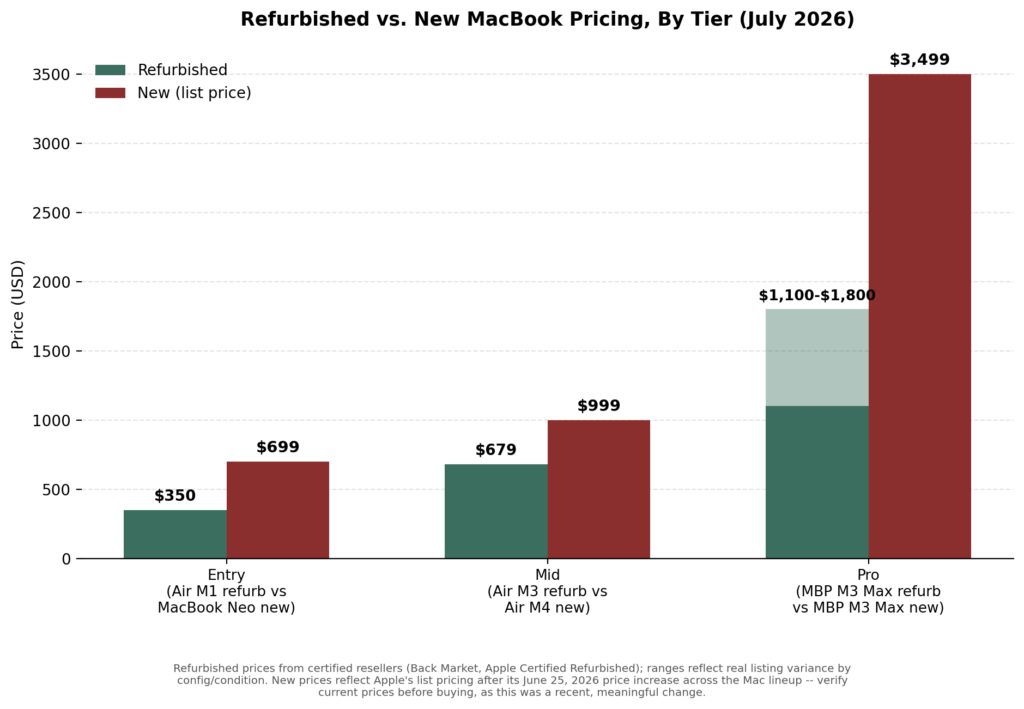
One thing worth flagging directly: Apple raised prices across nearly its entire Mac lineup on June 25, 2026, the MacBook Neo alone went up $100 that day. That price hike is exactly the kind of thing that makes any “current pricing” table go stale within weeks rather than months, so treat the figures below as a snapshot to verify, not a fixed reference.
At the entry level, a refurbished MacBook Air M1 runs around $350 through a certified reseller, compared to $699 for Apple’s own MacBook Neo (up from its March 2026 launch price of $599, after the June price increase). At the mid-tier, a refurbished MacBook Air M3 runs roughly $679 against a new MacBook Air’s list price; confirm the current figure directly with Apple given how recently pricing shifted. At the professional tier, refurbished MacBook Pro M3 Max units typically run somewhere in the $1,100-$1,800 range depending on configuration and cosmetic grade, against $3,499 or more for a comparable new model, still a substantial gap even accounting for that wide real-world variance.
Apple’s own Certified Refurbished store typically discounts 15% off retail with a full one-year warranty and a fresh battery. Third-party certified refurbishers (Back Market, Amazon Renewed) often go further – 25-40% off, occasionally up to 70% on older models in lower cosmetic grades while still including a warranty, typically 6-12 months.
The risk with refurbished hardware is not reliability, reputable certified sellers test and warranty every unit. It’s battery health and cosmetic condition, which vary by seller. Checking a listed battery cycle count before buying (Apple rates its batteries for 1,000 cycles to 80% capacity) is the single most useful thing you can do to avoid a disappointing purchase.
Read More: Best AI Tools for Productivity to Work Smarter in 2026
Budget Peripherals Worth Buying
| Category | Budget Pick | Premium Comparison | Honest Verdict |
|---|---|---|---|
| Wireless keyboard + mouse | Logitech MK540 ($59.99) | Logitech MX Keys S + MX Master 3S combo (~$240 list, though it’s frequently discounted to around $155) | The budget combo covers 90% of daily typing/clicking needs; the premium combo mainly adds better build quality and multi-device switching worth waiting for a sale on rather than paying full list price |
| Noise-canceling headphones | Anker Soundcore Q30 (~$79-99) | Sony WH-1000XM6 (current flagship, ~$449; the older XM5 is often discounted to ~$329-349) / Bose QuietComfort Ultra (~$429) | Budget ANC headphones block meaningfully less noise and have shorter battery life, but are genuinely usable for a home office, the premium tier is worth it mainly for frequent flyers and audio professionals. Anker’s step-up Q45 model (~$139-149) sits in between if the base Q30 feels too basic |
| External SSD | Budget USB-C SSD, 1TB (~$60-80) | Samsung T9 or SanDisk Extreme Pro (~$110-140) | Both are fast enough for everyday file transfer; the premium drives offer meaningfully better sustained write speeds only relevant for large video work |
Peripherals are the category where prices move fastest, and sales matter most, the Logitech premium combo is a good example, since its everyday street price runs well below its list price. Always check current pricing rather than assuming a number holds; the physical and acoustic engineering differences that justify the premium tier mostly matter for professional or frequent-travel use cases, not general home or office work.
How To Create An Effective Budget Technological Setup
A genuinely functional budget setup, priced out:
- A dependable device: a refurbished MacBook Air M3 (~$679) or a comparable Windows ultrabook in the same range
- Free productivity and cloud tools: Google Keep or Notion’s free plan, plus Google Drive’s 15GB free tier
- Cost-effective communication: free tiers of Slack, Zoom, or Google Meet cover the vast majority of freelance and small-business needs
- Basic security and backup: a password manager’s free tier (Bitwarden’s free plan is genuinely complete) plus the cloud storage above functioning as a lightweight backup
Total cash outlay for a complete, functional setup: roughly $700-900 one-time, plus $0-15/month in ongoing subscriptions if you stay within free tiers, a fraction of what an equivalent new, fully-subscribed setup would cost.
Budget Tech Trends For 2026
A few real, observable shifts worth tracking, rather than vague trend names:
- Free tiers on AI tools have gotten more generous, as major AI providers compete for user volume rather than gating basic functionality entirely behind a paywall
- Open-source software has matured to the point that tools like DaVinci Resolve and GIMP are genuinely viable primary tools, not just stopgaps
- Bundled subscriptions are consolidating, Microsoft 365 bundling OneDrive storage, for instance, means fewer people need a dedicated third-party storage subscription at all
- Refurbished hardware inventory has grown as newer chip generations (Apple’s M4 and M5, for instance) push previous-generation devices into a larger, better-tested secondary market
Why Is Low-Cost Technology Better Than High-Cost Technology for People?
“Better” isn’t universally true,, a professional video editor genuinely needs the sustained performance a premium laptop or headphone provides. But for the majority of everyday productivity, writing, communication, and light creative work, low-cost tools focus on the core function without the added complexity of features most people never open. That simplicity has a real, if modest, benefit: less time spent configuring or navigating unused features, and a smaller ongoing subscription bill to track and cancel later.
Final Thoughts
Working smarter in 2026 isn’t about spending less for its own sake, it’s about matching your spending to what you will use. A refurbished laptop with a checked battery health report, a cloud storage free tier sized to your real usage, and one or two well-chosen paid tools instead of five underused ones consistently outperform an expensive, over-provisioned setup in practice, not just in theory.
FAQs: Best Budget Tech Tools to Save Money & Work Smarter in 2026
Is a refurbished laptop as reliable as a new one?
Refurbished laptops from certified sellers (Apple Certified Refurbished, Back Market, Amazon Renewed) undergo functional testing and include a warranty, typically one year from Apple, 6-12 months from third-party certified refurbishers. The main variable to check yourself is battery cycle count, since that isn’t always reset on third-party refurbished units.
Which free cloud storage tier is actually the most usable?
Google Drive’s 15GB free tier is the largest from a mainstream provider, though it’s shared with Gmail and Google Photos. If you already pay for Microsoft 365, OneDrive’s bundled 1TB effectively costs nothing extra.
Are free design and video editing tools good enough for professional work?
For the large majority of freelance and small-business creative work, yes, Canva’s free plan and DaVinci Resolve’s free version cover most practical needs. Specific advanced workflows (complex colour grading, certain print-production standards) still favour paid tools like Adobe’s Creative Cloud apps.
How much can I realistically save buying refurbished instead of new?
Based on current pricing, savings run from roughly $200-350 at the entry level up to over $1,000 at the professional tier, with Apple’s own refurbished store offering about 15% off and third-party certified refurbishers often reaching 25-40% off.
What’s the single best first step to build a budget tech setup?
Start with your actual usage, not a shopping list, track which paid subscriptions you use weekly versus rarely for a month; cancel the rarely-used ones; and only then evaluate whether a refurbished hardware upgrade or a paid software tier is actually worth adding back.
About the Author
Emily Carter is a freelance writer and digital productivity researcher based in the United States. Over the past four years, she’s tested and written about the tools, apps, and platforms that freelancers and remote workers rely on daily, from security software like password managers to the AI tools and side-income platforms that make up the modern freelance toolkit. She writes from firsthand use, not press releases.

