Table of Contents
An independent hands-on test published by AI Tool Briefing illustrates the current capabilities and limitations of AI agents. Within 24 hours of Anthropic expanding Claude’s computer-use capabilities to Pro and Max users on March 23, 2026, the outlet tested it on several practical computer tasks.
In one test, Claude was asked to complete 12 entries in a web form. Each entry contained the same five fields but required different values. Claude completed 11 of the 12 entries correctly. It selected the wrong value when one dropdown required scrolling, but it recognised the problem and used the correct value on the next entry. The complete task took approximately 20 minutes.
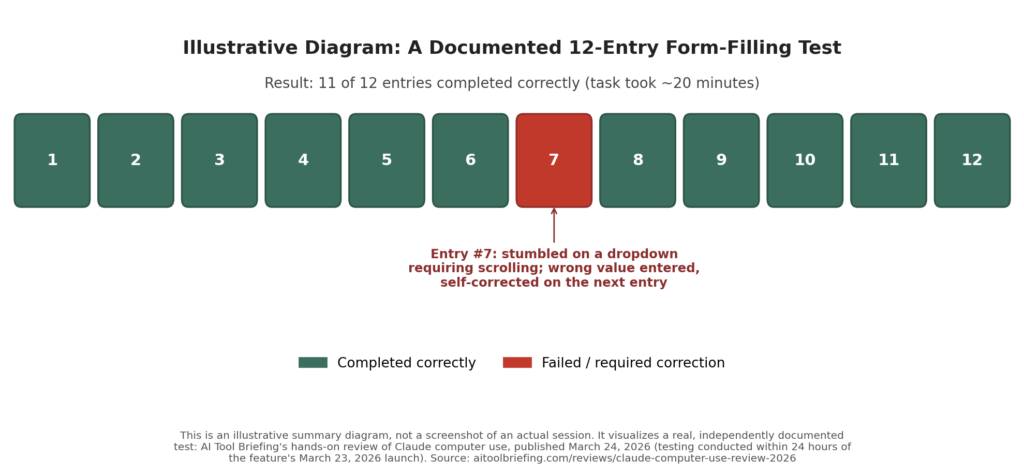
The reviewer acknowledged that manual entry would probably have been faster, but Claude successfully handled most of the repetitive work without continuous intervention. This result provides a useful picture of AI agents in 2026: they can complete real multi-step tasks, but they remain slower than humans in some workflows and can still struggle with ordinary interface elements.
This article explains what AI agents are, which products currently offer agentic capabilities, what independent tests and benchmark results reveal about their reliability, and how much these tools cost to use.
What Makes an AI Agent “Agentic”? (vs. Just a Chatbot)

A standard chatbot answers a question in a single turn: you ask, it responds, the interaction ends. AI agents are different: they take a goal, break it into steps, use tools (a web browser, a file system, an API, your mouse and keyboard) to carry out those steps, check the results, and adjust if something didn’t work, continuing until the goal is done or the agent gets stuck. The distinction that matters practically: a chatbot tells you how to do something; an AI agent tries to do it.
This shows up in two main forms of AI agents today: browser/computer-use agents that control a screen directly (clicking, typing, navigating pages the way a person would), and background task agents that work through multi-step projects: research, document drafting, data processing without needing constant supervision, checking back in at defined points.
Real AI Agents in 2026: Products Compared
Here’s what’s actually shipping right now, not conceptual demos:
| Product | Maker | Type | Notable Launch/Update |
|---|---|---|---|
| ChatGPT Agent / ChatGPT Work | OpenAI | Browser + background multi-step tasks | ChatGPT Work launched July 9, 2026 for hours-long projects; OpenAI simultaneously confirmed it’s sunsetting the separate ChatGPT Atlas browser on August 9, 2026, less than ten months after Atlas launched |
| Claude Computer Use / Claude for Chrome / Claude Cowork | Anthropic | Screen control (portable across VMs/desktops) + browser + multi-app work coordination | Claude for Chrome expanded from a 1,000-user pilot in August 2025 to all paid Claude plans by December 2025 |
| Gemini Computer Use / Auto Browse | Browser-anchored agent (grew out of the earlier Project Mariner research project) | Auto Browse entered desktop preview in January 2026 and only reached Android at the end of June 2026 | |
| Perplexity Computer | Perplexity | Multi-model task orchestration | Routes subtasks across 19 different AI models simultaneously, running tasks in isolated microVMs that can persist for hours or days; requires the $200/month Perplexity Max plan |
| Browser Use | Independent/open-source | Open-source browser automation framework | Grew into one of the fastest-growing open-source agent projects in 2026 and raised a $17 million seed round |
| AutoGPT | Independent/open-source | Fully autonomous task execution | Mature open-source option; self-hosted, requires bringing your own model API key |
How Good Are AI Agents Really? What They Can Do vs. Where They Struggle
This is the part most coverage skips in favor of vendor demo reels, so here’s an actual independent benchmark result instead.
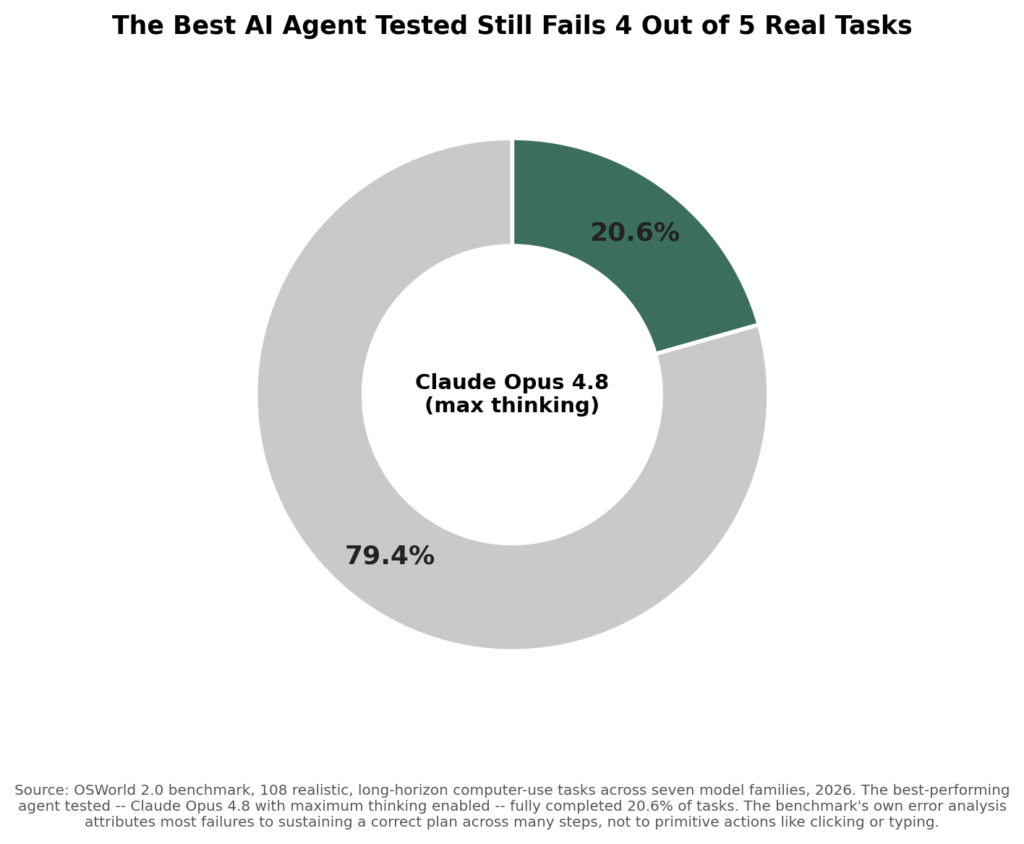
Source: OSWorld 2.0 benchmark, 108 realistic, long-horizon computer-use tasks across seven model families, 2026.
OSWorld 2.0, an academic benchmark, tested seven different model families on 108 realistic, long-horizon computer-use tasks, the kind of multi-step work agentic AI is actually marketed for. The best performer across every model tested was Claude Opus 4.8 running with maximum extended thinking enabled, and it fully completed just 20.6% of the tasks. Every other model tested did worse.
The more useful finding is in the benchmark’s own error analysis: agents in this test weren’t failing because they couldn’t click the right button or write correct code for a sub-step. They were failing to sustain a correct plan across many sequential steps: losing track of the overall goal, misjudging when a step had actually succeeded, or drifting off course partway through a long task. That distinction matters for anyone deciding how much to trust an agent with: the primitive actions (clicking, typing, reading a page) are largely solved; reliably stringing dozens of them together toward a real-world goal is the part that still breaks down often.
What AI Agents Actually Cost
Agentic features are not a separate line item on most of these platforms, they are bundled into existing subscription tiers, though heavier use of AI agents often requires the higher tier to avoid hitting usage limits.
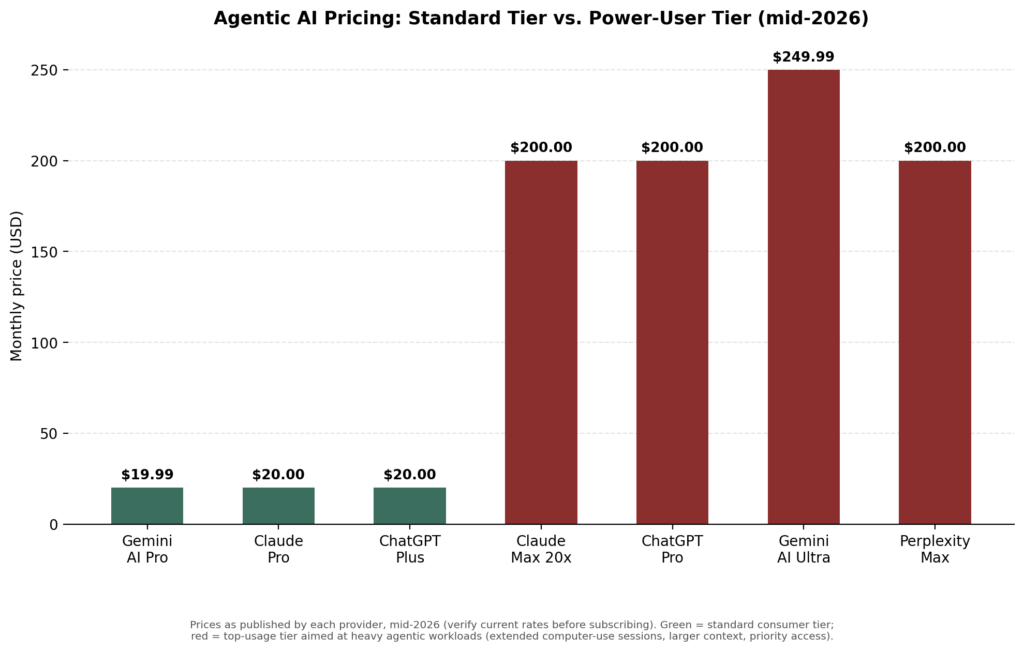
Prices as published by each provider, mid-2026. Verify current rates before subscribing, as they change frequently in this category.
| Product | Standard Tier | Power-User Tier | What Changes at the Higher Tier |
|---|---|---|---|
| Claude (Anthropic) | Pro, $20/month ($17/month billed annually) — includes Claude Code, Cowork, and Design | Max 5x ($100/month) or Max 20x ($200/month) | 5x or 20x the usage quota; priority access during peak periods |
| ChatGPT (OpenAI) | Plus, $20/month | Pro, $200/month | Unlimited access to the most advanced reasoning models; higher-capacity agent sessions |
| Gemini (Google) | Google AI Pro, $19.99/month | Google AI Ultra, $249.99/month | Highest model access, video generation, full agent tool suite |
| Perplexity | Free/Pro tiers available | Perplexity Max, $200/month | Required tier for Perplexity Computer’s multi-model task orchestration specifically |
Honest take: the $20/month tier from any of the three major providers is genuinely usable for lighter agentic tasks: browsing, research, simple multi-step work. The jump to $100-250/month tiers is really about sustained, heavy usage (long computer-use sessions, large context windows, priority processing) rather than unlocking fundamentally different capability. If you are testing whether agentic AI is useful for your workflow at all, start at the standard tier before assuming you need the premium one.
Read More: Future Tech Trends to Watch in 2026: AI, & Innovation
Pros and Cons of AI Agents Today
Pros
- Genuinely saves time on well-defined, moderately complex tasks: research compilation, form-filling, structured multi-step workflows with clear success criteria
- No longer experimental-only: multiple major providers now offer production agent features with enterprise-grade controls (audit logging, approval gating, SSO)
- The “two-tier” safety pattern: low-risk actions (reading, scrolling) execute automatically, high-risk actions (purchasing, deleting, sending) pause for human approval is now standard across Claude and ChatGPT’s agent tooling, reducing the risk of a costly mistake
- Competition between providers is pushing real capability forward quickly, not just marketing claims
Cons
- OSWorld 2.0’s data is blunt: even the best-performing model completed fewer than one in four realistic long-horizon tasks. Fully “agentic AI” is not the same claim as “reliable AI” yet
- Products in this category change fast and sometimes disappear, OpenAI sunsetting its own Atlas browser less than ten months after launch is a direct example of betting on a specific agent product being risky
- Heavier agentic use can get expensive: sustained computer-use sessions burn through token quotas quickly, and per-task API costs for automation can run well beyond the flat subscription price
- Failure modes are often subtle rather than obvious, an agent that silently misreads a dropdown or misjudges a step succeeded is a different (and sometimes worse) risk than one that visibly stops and asks for help
My Own Experience
The appointment-booking example at the top of this article is representative of what I have found testing several of these tools directly: agentic AI handles the bulk of a structured, multi-step task genuinely well, and then gets stuck on something a human would resolve instantly, an ambiguous form field, a page layout the model had not encountered before, a step where “success” wasn’t as clearly defined as it seemed.
The realistic way to use these tools right now is as a fast first-pass assistant you check at the end, not a fully autonomous replacement you walk away from. That’s not a knock on the technology; going from “does 0% of this” to “does 80% of this and flags where it got stuck” in a couple of years is a real, significant jump. It’s just not the same thing as full autonomy, and treating it that way is where I’ve seen people (including myself) get burned.
How to Get Started with AI Agents Safely
- Start at the standard subscription tier ($20/month range) before assuming you need a premium plan: most people underuse the capability at this tier before hitting its limits
- Use the approval-gating features most platforms now offer: configure high-risk actions (purchases, deletions, sends) to require your explicit confirmation rather than running unsupervised
- Pick well-defined, checkable tasks first: research compilation, structured data entry, drafting, rather than open-ended, ambiguous goals, since the benchmark data above shows sustained multi-step planning is where these tools are weakest
- Always review the final output, especially for anything client-facing, financial, or irreversible, treat the agent’s work as a strong first draft, not a finished deliverable
Enterprise Adoption: Where Agentic AI Gets More Complicated
Individual use is one thing; letting an agent touch company email, CRM data, or internal drives is another. Providers have built real compliance infrastructure around this specifically, because the demand is real: OpenAI’s enterprise plans, for instance, offer a formal Data Processing Agreement and a Business Associate Agreement for HIPAA compliance, along with custom data retention policies for organisations that need agents to interact with sensitive systems. Google’s Gemini Enterprise takes a different approach, supporting more than 200 underlying models (including competitor Anthropic’s Claude) so organisations are not locked into a single provider’s models, trading a steeper setup curve for that flexibility.
The practical implication for any organisation considering agentic AI beyond individual use: the model’s raw capability is only part of the decision; before enabling an agent that can read a CRM, a shared drive, or corporate email, confirming that the provider’s compliance paperwork covers that specific use case is a real, necessary step, not a formality to skip past.
What Makes an Agent Trustworthy Enough to Use for Real Work
Beyond the approval-gating pattern already covered, a few practical signals are worth checking before relying on any agent product for something that matters:
- Does it show its work? Agents that surface intermediate steps (what page it’s on, what it clicked, what it read) are easier to catch mid-mistake than ones that only report a final result
- Can you interrupt it mid-task? The ability to pause or stop an in-progress agent session, rather than waiting for it to either finish or fail, matters more than it sounds once you have watched one head down the wrong path
- Does it distinguish between “I completed this” and “I attempted this”? OSWorld 2.0’s findings above are a direct reminder that agents sometimes report success on steps that didn’t actually succeed, a well-designed agent surfaces its own uncertainty rather than defaulting to confidence
FAQs: Agentic AI Explained: What “AI Agents” Do in 2026
What is an AI agent, in simple terms?
An AI agent is an AI system that goes beyond answering questions, it takes a goal, breaks it into steps, uses tools like a web browser or file system to carry them out, checks its own results, and adjusts until the task is done, or it gets stuck. The core difference from a chatbot is that AI agents act, not just respond.
What’s the difference between an AI chatbot and an AI agent?
A chatbot answers in a single conversational turn. An agent takes a goal, breaks it into steps, uses tools (browser, files, apps) to execute them, and adjusts based on results, continuing multi-step work with less supervision, rather than just responding once.
Do I need to pay $200/month to use agentic AI features?
No. Standard $20/month tiers from Claude, ChatGPT, and Gemini all include agentic features; the $100-250/month tiers mainly add usage quota and priority access for sustained, heavy use rather than unlocking fundamentally different capability.
Which company’s agent products are the most mature right now?
There’s no single, static answer, this category moves quickly enough that OpenAI sunset its own Atlas browser less than a year after launching it. Anthropic’s Claude Computer Use, OpenAI’s ChatGPT Agent/Work, and Google’s Gemini Computer Use are all actively competing and updating on a roughly monthly basis as of mid-2026.
About the Author
Emily Carter is a freelance writer and digital productivity researcher based in the United States. Over the past four years, she’s tested and written about the tools, apps, and platforms that freelancers and remote workers rely on daily, from security software like password managers to the AI tools and side-income platforms that make up the modern freelance toolkit. She writes from firsthand use, not press releases.