Table of Contents
I switched budgeting apps three times in the two years after Mint shut down. Each move taught me something the app’s marketing page didn’t: free tiers are rarely as complete as they look, “bank sync” doesn’t mean the same thing across apps, and the app you will actually stick with matters more than the one with the longest feature list. This guide reflects that ten apps that are genuinely available and priced accurately as of 2026, not a recycled list from before some of them changed hands or shut down entirely.
Why Finance Apps Matters More Than Ever
You can use cashless payments, subscriptions, and digital banking to easily get lost in how your money is being spent. You may have a few $9.99 subscriptions, or a couple of “buy now, pay later” purchases, but without one big, obvious purchase, it’s easy to not notice how much it adds up to as a monthly expense. Finance apps can help bridge this gap by showing you your spending again. For most people, that’s what’s really needed for “financial discipline.”
Many modern finance apps offer many features beyond just basic budgeting and provide:
- Numerous options to auto-categorise transactions
- Visualisation of your spending with reports on trends
- Alert systems that will notify you if you are overspending or there is unusual activity on your account
- Ability to track bills and subscriptions
- Ability to manually or offline track your expenses if you don’t want to connect your bank account
By combining these types of features, you can go from a fuzzy idea of “I probably spend too much on X,” to an actual number, which you can then use as a defined starting point to change your habit.
Read More: Best AI Tools for Productivity to Work Smarter in 2026
Top Digital Finance Apps to Manage Money Smartly
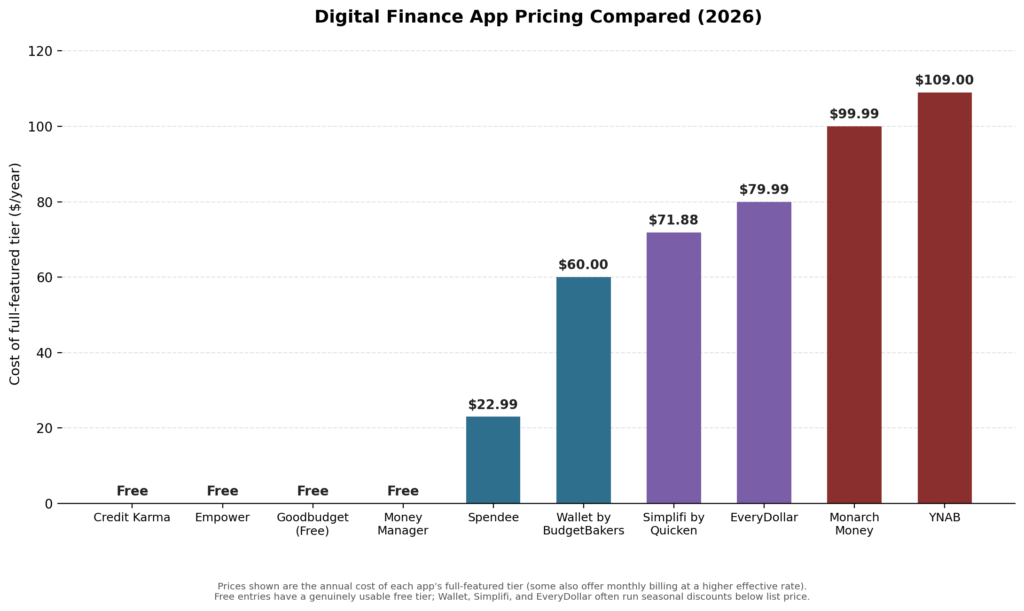
Annual cost of each app’s full-featured tier. Several run seasonal discounts below list price; check the app directly before committing to annual billing.
1. Credit Karma
If you have seen “Mint” recommended anywhere in 2026, that recommendation is out of date. Intuit officially shut Mint down on March 23, 2024, after 17 years and roughly 3.6 million active users, and directed everyone toward Credit Karma, another Intuit product. It’s worth being direct about this since so many “best finance apps” lists still list Mint as if it’s active.
The honest situation: Credit Karma is free and still around, but it’s primarily a credit-monitoring product, not a full budgeting replacement. It shows linked accounts, transactions, and spending over time, but it lacks Mint’s dedicated budgeting tools. If what you actually want is Mint’s old day-to-day budgeting experience, YNAB or Simplifi by Quicken (both covered below) are closer functional matches. If you want Mint’s old free dashboard-style overview, Empower (also below) is the closest free option. There isn’t a single app in 2026 that replaces everything Mint did for free; that combination genuinely doesn’t exist anymore, and it’s better to know that going in than to keep hunting for a free clone that isn’t coming back.
2. YNAB (‘You Need A Budget’) – For Intentional Spending
YNAB’s (You Need A Budget) approach – a method of using every dollar to complete a specific purpose before it gets spent – is still the best way to get out of a paycheck-to-paycheck cycle. This is because by using YNAB, you will be forced to make a decision regarding how you will spend the money you will receive for the next month instead of simply reviewing your previous spending history on a report.
Price: YNAB has a cost of $109 per year or $14.99 per month, with a 34-day free trial that allows students to apply for a free, 12-month student subscription.
Pros: This program truly changes your spending habits rather than merely giving you a new way of seeing your transactions; YNAB has a widely used website; and YNAB has many opportunities for support through educational videos, articles, and a community of YNAB users who can provide peer support.
Cons: YNAB has the most expensive long-term subscription costs on the list; and YNAB’s zero-based budgeting method will take time for you to learn, so this method of budgeting will not work for anyone who is looking for a fully automated or hands-off approach to budgeting.
3. Goodbudget – Envelope Budgeting Made Easy In The Digital Age
Goodbudget is a digital version of the traditional envelope budgeting method. You create “envelopes” for expenses such as groceries or rent and manually enter the dollar amounts you have allocated into each envelope. Spending is not automatically deducted from your bank account; instead, you manually track your spending using the Goodbudget app.
Price: Goodbudget is free for up to 20 envelopes and 2 devices; Goodbudget Plus has a subscription cost of $7/month or $70/year and allows for creating additional envelopes, syncing with additional devices, and having a longer budgeting history.
Advantages: Goodbudget does not require you to provide banking credentials, so you can maintain your privacy; Goodbudget is a good budgeting tool for partners who are budgeting together.
Disadvantages: Goodbudget does not make budgeting faster, but it is a reasonable budgeting tool for managing your budget.
4. Empower Personal Dashboard – Budgeting Plus Investments
In 2023, Personal Capital underwent rebranding to become Empower Personal Dashboard, which means when you search online for “Personal Capital” you may only get results that include other Empower products. They do have strong features that allow for budget and investment tracking purposes, along with net worth reporting. It is definitely one of the most robust free apps for users who use Mint primarily for monitoring net worth and total portfolio value versus daily tracking of budgeted expenses.
Cost: Free for basic budgeting features, net worth tracking, and investing features.
Includes:
Pros: Empower’s free tier is a considerable amount of capability toward tracking/monitoring/budgeting in real time, offering full access to investment accounts as well as commercial banking activity. The only limitation from the basic free version of Empower is that the primary reason has been created by Empower’s construction of the “Wealth Management Company”. Therefore, they will reach out to you about these additional services as often as possible (which you will likely receive emails about rather than phone calls) throughout your partnership with Empower as the registered owner of your account.
Cons: The budgeting tool is not as comprehensive as some of the dedicated budgeting services apps such as YNAB (you will prefer them) or Mint (you will enjoy them much more).
5. Money Manager – Easy to Use and No Internet Connection Required
Money Manager remains a solid pick for anyone who specifically doesn’t want to link a bank account at all. It logs income and expenses manually and works fully offline, which appeals to privacy-conscious users who’d rather not hand banking credentials to any third party.
Pros: Complete manual control, works with no internet connection, no bank-linking privacy exposure.
Cons: No automatic transaction import means more manual data entry than most other apps on this list.
6. EveryDollar – Fast and Straightforward Budgeting
EveryDollar, from Dave Ramsey’s Ramsey Solutions, uses the same zero-based budgeting philosophy as YNAB but with a simpler, more guided setup. The app relaunched in early 2026 with a refreshed design and a “margin finder” feature that highlights breathing room in your budget.
Pricing: Free version supports a full manual zero-based budget; Premium (adds automatic bank syncing) runs $79.99/year.
Pros: Simpler onboarding than YNAB for the same underlying method; the free tier is usable on its own if you’re willing to enter transactions manually.
Cons: Without Premium, there’s no automatic bank import, which is a significant manual burden for people with a lot of transactions.
7. Spendee – Easy to Read and Use
Spendee‘s appeal is almost entirely in its interface: clean charts, a timeline view of transactions, and a shared-wallet feature that makes joint expense tracking with a partner or roommate straightforward.
Pricing: Free for one manual wallet; Premium (bank connections, shared wallets, multi-currency) runs about $2.99/month or $22.99/year.
Pros: One of the most affordable paid tiers here; genuinely easy for a first-time budgeter to pick up in minutes.
Cons: Bank-connection reliability varies by region; worth testing during any free trial before committing annually.
8. Simplifi by Quicken – Smart Forecasting
Simplifi leans into forward-looking cash flow, showing upcoming bills and projected balances rather than only summarising what’s already happened. Of everything on this list, it’s arguably the closest in spirit to what Mint’s automatic-import experience felt like day to day.
Pricing: $71.88/year (about $5.99/month), often discounted to around $2.99/month for a first-year promotion.
Pros: Forward-looking forecasting is genuinely more useful than backwards-looking reports for avoiding overdrafts; backed by Quicken’s decades of financial-software experience.
Cons: Lighter on investment tracking and net worth detail than Empower or Monarch.
9. Wallet by BudgetBakers – All-in-One Finance Tool
Wallet combines budget planning, savings goals, and cash-flow analysis with both manual and bank-linked tracking, and syncs with a notably wide range of banking institutions, a real strength for users outside the US, since it’s built by a Prague-based company operating under EU data-protection rules by default.
Pricing: Free version is functional but limited; Premium runs roughly $5.99/month, with an occasional one-time lifetime purchase option around $49.99.
Pros: Strong multi-currency and international bank support; EU-based privacy framework is a genuine differentiator for European users.
Cons: Some users report inconsistent customer support response times when something goes wrong with syncing, worth testing the free tier’s reliability with your specific bank before paying for Premium.
10. Monarch Money – The Modern Mint Replacement
Rounding out this list: Monarch Money is widely considered the most direct paid successor to what Mint actually was founded in part by former Mint team members; it covers budgeting, account aggregation, net worth, and investment tracking in one dashboard, with a genuinely polished, modern interface.
Pricing: $99.99/year (Core) or $199.99/year (Plus, adds retirement forecasting and small-business P&L tracking), with a 7-day free trial.
Pros: The closest all-in-one match to Mint’s original scope; supports adding a partner to the same subscription at no extra cost.
Cons: No meaningful free tier; you are paying from day one after the trial, which is the trade-off for the feature breadth.
Choosing the Right Finance App for You
There’s no single best app; there’s a best app for your specific situation. Use these questions to narrow it down:
- Do you want automation or control? Automatic bank-synced apps (Simplifi, Monarch, Empower) save time; manual apps (Goodbudget, Money Manager) trade time for privacy and precision.
- Do you have investments to track alongside spending? Empower and Monarch handle this well; YNAB and EveryDollar are built for spending discipline specifically, not portfolio tracking.
- Are you budgeting with a partner? Goodbudget and Monarch both support shared access cleanly.
- How much are you willing to pay, if anything? Empower and Credit Karma cover real needs for free; YNAB and Monarch are the most expensive but also the most complete for people who want a genuine Mint-style all-in-one replacement.
The best app is still the one you’ll actually open every week; a feature-rich app abandoned after two weeks does less for your finances than a simple one you check consistently.
Digital Finance for Newbies: Mistakes You Should Avoid
- Downloading three or four apps at once “to compare.” Most people end up using none of them consistently. Pick one, commit to a full month, and only then decide whether to switch.
- Setting an unrealistically strict budget in week one. A budget that assumes you’ll never order takeout again usually collapses within two weeks; build in a realistic amount for the categories you know you actually spend on.
- Assuming “free” and “full-featured” are the same thing. Several apps on this list (EveryDollar, Wallet, Simplifi) gate automatic bank syncing behind a paid tier; check that specifically if it’s the feature you actually want.
- Ignoring how a discontinued app affects your data. Mint’s shutdown left users scrambling to export data before access disappeared entirely. When picking any app going forward, check whether it offers a straightforward data export, in case history repeats itself.
Final Thoughts
Money management doesn’t require complexity; it requires consistency with a tool that actually fits how you think about money. Whether that’s a free manual tracker, an envelope-based app, or a paid all-in-one dashboard, the apps above are all genuinely available and accurately priced as of 2026, which, after Mint’s shutdown left so many “best of” lists quietly wrong, is worth confirming before you commit to any of them.
FAQs: Top 10 Digital Finance Apps to Manage Money Smartly
1. Which app is the best free replacement for Mint’s all-in-one dashboard?
Empower (formerly Personal Capital) is the closest free option for net worth and investment tracking. For pure budgeting without bank-linking, Goodbudget’s free tier is a strong alternative.
2. Are digital finance apps safe to link to my bank account?
Reputable apps use encrypted connections through established providers like Plaid, and reputable European apps like Wallet by BudgetBakers operate under PSD2 licensing and GDPR. That said, no bank-linked app is entirely risk-free; apps like Goodbudget and Money Manager that skip bank-linking entirely offer the strongest privacy guarantee by design, at the cost of manual entry.
3. Do any of these apps replace a traditional bank account?
No. Every app on this list is a tracking and budgeting tool, not a bank; they read data from or supplement your existing accounts rather than holding your money directly.
4. What’s the cheapest way to get real budgeting value in 2026?
Goodbudget’s free tier (up to 20 envelopes) or Empower’s free dashboard both provide genuine, non-trial functionality at no cost, a reasonable starting point before paying for YNAB, Monarch, or any other subscription app.
About the Author
Emily Carter is a freelance writer and digital productivity researcher based in the United States. Over the past four years, she’s tested and written about the tools, apps, and platforms that freelancers and remote workers rely on daily, from security software like password managers to the AI tools and side-income platforms that make up the modern freelance toolkit. She writes from firsthand use, not press releases.