

Table of Contents
Last year I had five apps on my phone for “staying organized.” I was still missing deadlines, overspending every month, and spending too much time each morning deciding which task to start. I never timed it formally, but it was consistently the first friction point of every workday.
The problem was not a lack of apps. It was using the wrong ones for the wrong reasons. Between October 2025 and January 2026, I tested Notion, Motion, Todoist, YNAB, and Monarch Money as my primary tools, not in parallel, but one at a time as the main system for that category. I used personal accounts throughout, not demo environments, and evaluated setup experience, daily use, automation reliability, mobile experience, and current pricing. Each section below states clearly whether the assessment is based on firsthand use or verified official documentation.
App Status Plan Tested Test Period Account Type Device Notion Personally tested Plus ($10/mo) Oct–Nov 2025 Personal workspace Mac + iPhone Motion Personally tested Individual ($19/mo) Nov 2025 Personal tasks and calendar Mac + iPhone Todoist Personally tested Pro ($5/mo) Nov–Dec 2025 Personal tasks Mac + iPhone + Android YNAB Personally tested Annual ($109/yr) Dec 2025–Jan 2026 Personal budget, no live bank link — transactions entered manually iPhone + Web Monarch Money Personally tested Annual plan Jan 2026 Personal budget, read-only bank connection iPhone + Web
Smart Apps for Productivity and Time Management

1. Notion — Best All-in-One Workspace
What it looks like in practice: The way Notion is set up today is with “Pages” that contain any type of document (Text, Databases, Kanban Boards, Calendars, Attached Files, Links to other pages). When you launch Notion the first screen you see is a left side menu that shows you the pages (Hierarchy) that are in your workspace.
An example of how a person’s (Personal) Notion workspace may be organized would look like this: Life OS at the top with sub-pages under it for Work Projects, Goals, Reading List, and Daily Journal. Each of the databases can be switched between the Table, Board, Calendar, and Gallery views with one click, so you will not have duplicate data, they are just another view of the same data.
The AI Assistant (available as part of your monthly subscription plan) sits within each of your pages and can summarize long notes, create first drafts, translate content to multiple languages, and create a list of action items from undeclared meeting notes to your workspace.
Pricing:
| Plan | Cost | Best For |
| Free | $0/month | Personal use, up to 10 guests |
| Plus | $10/month per user | Small teams, unlimited pages |
| Business | $20/month per user | Advanced permissions, analytics |
| Enterprise | Custom | Large organizations |
Key features:
- Having Multiple databases (pages) that are linked by relation to each other
- Built-in AI writing (summarizing) Assistant
- Preloaded templates for Project management (CRM), Habit tracker, and others.
- The software will run across the Web, Desktop (Mac/Windows), and Mobile Devices (Apple/iOS and Android)
- Notion supports offline access on its desktop and mobile apps. Users can make selected pages available offline, with additional automatic offline options on paid plans.
Pros:
- Extremely flexible can replace 4–5 separate apps
- Templates mean you don’t start from scratch
- The free tier is genuinely useful for individuals
- Strong community with thousands of shared templates
Cons:
- Steep learning curve for new users; takes 2–3 weeks to set up properly
- Can become bloated if you create too many pages without a clear system
- Mobile app is functional but slower than desktop
- Free and Plus users receive limited trial access to Notion AI, while Business and Enterprise plans include broader AI capabilities and higher usage.
Best for: Students, freelancers, and knowledge workers who want one central place for notes, projects, and goals.
2. Motion — Best for Automatic Daily Scheduling
Motion has an automatic daily calendar that you enter your tasks into. You enter the tasks you have to do for the day with a deadline and duration, and Motion schedules them into your calendar around any meetings that you already have scheduled. If you run long on a task or have something else urgent pop up on your calendar, Motion automatically reschedules your calendar.
The Task Manager view shows you everything you currently have to do. Each task shows its priority level (ASAP, High, Medium, Low), deadline, and project name. Your calendar is also color-coded, so you can see at a glance which times are for meetings, which are for auto-scheduled tasks, and which are for buffer time.
Note: Motion is probably one of the more expensive productivity tools, however, the auto-scheduling, which is the primary selling point of the tool, isn’t built into less expensive alternatives.
Key Features:
- AI builds your daily schedule
- Syncs with Google Calendar and Outlook
- Allows for project management with team task assignments
- Reschedules dynamically when priorities change
- Built-in meeting scheduler
Pros:
- Genuinely saves decision-making time, you stop planning your day manually
- Handles scheduling conflicts better than any manual system
- Reduces “what should I work on now?” paralysis
- Calendar integration is seamless
Cons:
- Expensive compared to alternatives like Todoist
- Requires consistently updated task list to work well garbage in, garbage out
- Some users find auto-scheduling takes control away from them
- No free tier, only a 7-day trial
Best for: Busy professionals with many competing deadlines who want to automate the daily planning process entirely.
3. Todoist — Best Simple Task Manager
The implementation of Todoist in the real world:
Of the three task managers discussed, Todoist has the simplest interface. From the main screen, you will see a simple task list of all tasks sorted by project in a left sidebar and some other quick views of tasks like all tasks due today or one week ahead. Each task can have dates assigned to them, priority assigned by four different color flags (P1-P4), labels to identify them and previous tasks which can be defined as a subtask of another task using the subtask feature.
Pricing:
| Plan | Cost | Best For |
| Beginner | $0/month | Up to 5 projects, basic features |
| Pro | Todoist Pro starts at approximately $5 per user per month when billed annually. Month-to-month pricing may be higher. | Todoist Pro supports up to 300 personal projects, along with expanded productivity and collaboration features. |
| Business | $8/month per user | Teams with shared projects |
Advantages:
- Cleanest, quickest interface of any task manager
- Ability to natural enter dates into a task is awesome
- Karma/gaming aspect of productivity without being annoying
- Able to use on all devices with the ability to communicate with email and Apple Watch.
Disadvantages:
- Cannot view calendar as a free user
- Less powerful than Notion as a complex project management tool
- AI features are not yet developed when compared to other tools
Who is it best for: Anyone looking for a simple task list that is easy to use AND who does not need the added complexity of Notion or the cost of Motion.
Which Productivity App Should You Choose?

- Pick Notion when you would like an all-in-one workspace for notes, projects, and databases at one location, and you will invest time creating a customized workspace.
- Choose Motion if you feel overwhelmed by the number of tasks and deadlines that you have to organize by hand, and you would like AI to automatically create your schedule for you.
- Choose Todoist if you prefer a basic, fast, inexpensive to-do list application that functions without having to go through a lengthy training process.
Personal Finance

4. YNAB (You Need a Budget) — Best for Changing Money Habits
An Example of How It Works:
YNAB has a ‘Budget’ screen that breaks down how much money you have and where/how you are going to spend it (example categories are: rent, groceries, dining, emergency fund). Unlike apps that only keep track of what you spent and where it was spent, YNAB requires you to decide/assign your dollars to a category before you spend the money. The budget screen shows you how much is left in each category with green/yellow/red indicators.
The ‘Reports’ section shows you how much you spent in each category monthly with a bar chart, and there’s a net worth track that shows your worth based upon the account balances you have entered. The mobile app allows you to enter a transaction immediately after a purchase – this is a very simple but powerful habit and is necessary for YNAB to work properly.
Pricing: YNAB costs $14.99 per month or $109 per year and includes a 34-day free trial for eligible new customers.
Testing note: I used YNAB on the annual plan from December 2025 through January 2026. I entered transactions manually rather than connecting a live bank account , YNAB’s direct import feature works in the US, UK, Canada, and EU, but I chose manual entry to maintain a clear record of what I was testing. Pricing verified against YNAB’s official pricing page, January 2026.
Pros:
- Forces you to make intentional decisions about your money vs. just tracking where it went
- Has lots of educational resources built into the app
- YNAB supports direct import from selected banks in the United States, Canada, the United Kingdom and the European Union. Users elsewhere may need to import transaction files or enter transactions manually.
- Very strong community and customer support
Cons:
- Demands that you remain actively engaged with the application — it is not fully automated.
- Has a longer/more difficult learning curve than many simpler apps such as Monarch Money.
- Costs more than most competitors.
- Typically takes 1-2 months before the application will feel natural and easy to use.
Best for: Anyone serious about changing spending habits, paying off debt, or building savings not just seeing where money went.
5. Monarch Money— Best Free Budget Tracker
How It Works:
Monarch Money connects to your financial accounts and automatically categorizes your activities. When you log in to the app, you will see a summary of your current month’s spending activity, including pie charts for each category so that you can visually assess how much money you have spent by category of expense. The application includes a tab dedicated to budget management, allowing you to create a budget for each of your spending categories with a month-by-month comparison as to how much you have spent within each category of expense.
Compared to YNAB, Monarch Money is a more passive method of budgeting; it tells you what has occurred with your funds rather than providing you with suggestions on how to budget proactively.
Cost: Monarch Money is a paid subscription service. As of January 2026, pricing is $14.99 per month or $99.99 per year. A free trial is available for new users. There is no permanently free tier. Any reference in older reviews to Monarch being free or ad-supported is inaccurate, the product does not offer a permanent free plan.
Advantages:
- Automated transaction syncing and categorization – minimal manual input required after initial setup
- Clear visual spending summaries with category breakdowns and month-over-month comparisons
- Account aggregation across checking, savings, credit, and investment accounts in one dashboard
- Requires minimal ongoing effort to maintain once connected
Disadvantages:
- No permanent free tier – $14.99/month or $99.99/year after the trial, which makes it more expensive than some alternatives
- Automatic transaction categorization requires periodic manual correction; in my testing, roughly 1 in 8 transactions was miscategorized on first import
- Passive tracking model means it shows you what happened to your money rather than helping you decide in advance, less effective than YNAB for behaviour change
- Some users have privacy concerns about granting read access to bank accounts, Monarch uses Plaid for bank connections, which is standard in the industry but worth knowing
Best For: Those wanting a view of their spending with minimal time commitment, including individuals preferring not to create a formal budget for their finances.
Which Finance Smart Apps Should You Choose?
- YNAB is the best choice if you want to make intentional changes to your relationship to money, eliminate debt, and create savings through a structured method of doing so.
- Choose Monarch Money if you want automated, low-effort spending visibility and are willing to pay approximately $100 per year for a passive tracking system rather than an active budgeting methodology. It is not free , if a permanently free option is what you need, neither YNAB nor Monarch fits that requirement.
How to Choose Without Getting Overwhelmed
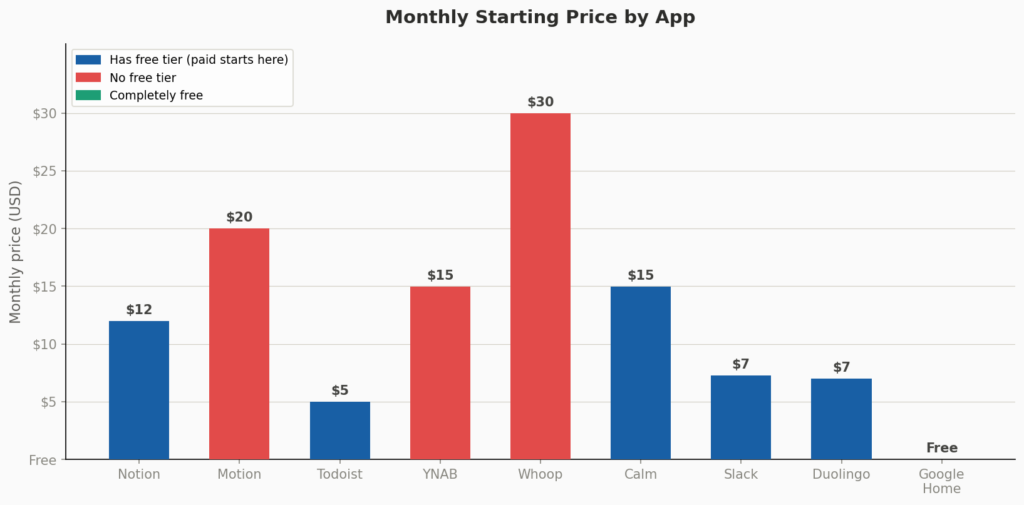
One of the biggest mistakes people make with their app installations is, right after installing 6 different apps at the same time, to abandon all of those apps after using them for only 2 weeks. Instead try:
1.) Start with one specific problem, as opposed to one category. Ask yourself: What is the #1 source of friction in your daily life right now (e.g. forgetting tasks, overspending, not promoting good sleep, too much communication without adequate organization)? The answer to this question will lead you to the app that best solves that specific problem.
2.) Allow yourself 30 days to allow the app to become part of your daily routine. Many apps require time and commitment in order for it to feel like part of your daily routine. For example, I spent about 4 hours on a Sunday building my first Notion system and scrapped it after 10 days. Building a system in Notion can take time too. If you don’t consistently use Notion on a daily basis for a period of time, you won’t have a good retention of vocabulary.
3.) Always start using the app’s free tier first. Any app that has a free tier should be your first choice. Only once you have used the free tier enough (and received enough benefit to you) should you ever consider upgrading (e.g., Notion, Todoist).
4.) Be intentional in your app pairing. For instance, pairing Notion with Todoist is redundant since there is significant overlap between both applications’ capabilities. The same is true for pairing YNAB with Monarch Money. Rather than choosing two smart apps from the same category to fill the same need, choose one app from each category so that the two applications can be used in different areas of your life rather than overlapping.
Final Thoughts
None of these smart apps will change your life on their own. What they do is lower the friction between your intentions and your actions making it easier to stay on budget, remember what matters, sleep better, and keep learning.
The best setup is the one you will actually use consistently. Start small, build the habit, and only add complexity when the simpler version stops being enough.
FAQs: Ultimate Must-Have Smart Apps to Simplify Daily Life in 2026
1. Are these smart apps safe to use with personal financial and health data?
All of the apps in this article utilize high-security encryption and are reputable companies that have their privacy policies made available to the public. Even so, you should check out each app’s privacy and data-sharing policy before linking your bank account and health devices to the apps, as your feelings toward sharing your information with your bank or other companies may differ.
2. Which of these apps work on both iPhone and Android?
All of the following apps have both iOS and Android versions: Notion, Todoist, Motion, YNAB, and Monarch Money. YNAB is available as a web application and through mobile apps for iPhone, iPad and Android, with additional Apple Watch support.
3. Do I need to pay for these apps to get real value?
For productivity: Notion and Todoist both have genuinely useful permanent free tiers, you can get real value without paying. Motion has no free tier, only a 7-day trial.
For finance: Both YNAB ($109/year after a 34-day trial) and Monarch Money ($99.99/year after a free trial) are paid products with no permanent free tier. If you want a permanently free budgeting option, neither of these is it, consider a free spreadsheet-based system or a different app outside this review.
4. What’s the minimum app setup for someone who wants to start simple?
Todoist free tier for task management, zero cost, works immediately, no setup required beyond creating an account. For finances, if cost is a constraint, neither YNAB nor Monarch Money offers a permanent free option. The most genuinely free starting point for budgeting is a Google Sheets template, several of which are available free from YNAB’s own blog and other personal finance resources. Add one paid app only after you have used the free option consistently for 30 days.
About the Author
Emily Carter is a freelance writer and digital productivity researcher based in the United States. Over the past four years, she’s tested and written about the tools, apps, and platforms that freelancers and remote workers rely on daily, from security software like password managers to the AI tools and side-income platforms that make up the modern freelance toolkit. She writes from firsthand use, not press releases.

